Ingres Db

The latest version of Ingres relational database now also includes support for geospatial data. GIS functions and spatial data types are included out-of-the-box (i.e. do not require additional plug-ins) and make it easy to enable web mapping. Ingres 10S supports spatial applications, such as Esri’s ArcGIS for Desktop and FME but also MapServer and GeoServer.

Ingres 10S is supported by other programming libraries including GDAL/OGR and GeoTools, allowing import, export and manipulation of vector data. Ingres 10S leverages the GEOS geometry and PROJ cartographic projection libraries for manipulating and transforming spatial data between dozens of geographic and planar co-ordinate systems.

Ingres 10S is an open source, enterprise grade database, not as popular as MySQL or PostgesSQL but, as the other options, can be downloaded and used for free. Ingres was first created as a research project at the University of California, Berkeley in the early 1970s. Since the mid-1980s, Ingres has spawned a number of commercial database applications, including Sybase, Microsoft SQL Server, NonStop SQL, but also open source PostgreSQL (which with PostGIS extension is the most popular open source spatial database).
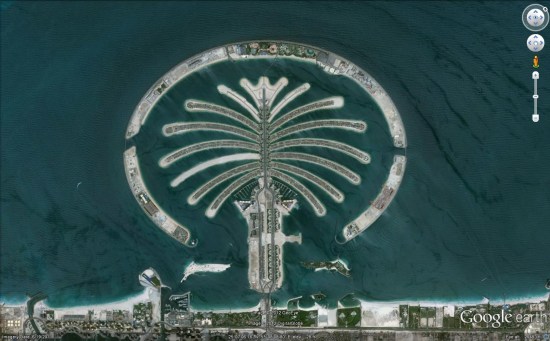
The New Google Earth Imagery – February

Google has just pushed out a fresh batch of new imagery to a variety of places around the world.

dubai.jpg

Due to the new “Pretty Earth” imagery, it’s more difficult to spot fresh imagery. Also, the imagery this month arrived in Google Maps before Google Earth, which threw us off a bit. In any case, here are some of the locations that GEB readers have identified as having fresh imagery. Many of them were made aware of the new imagery via the Follow Your World notifications, which we certainly encourage you to sign up for.

Here is the list of updated areas we know about so far:

  • Canada: Villeneuve
  • Italy: Vernazza
  • Romania: Deva
  • Spain: Villacariedo
  • United Arab Emirates: Dubai
  • United States: California (Chino, Eureka), Illinois (Decatur), Louisiana (Alexandria), North Dakota (Minot), Tennessee (Johnson City, Kingsport)

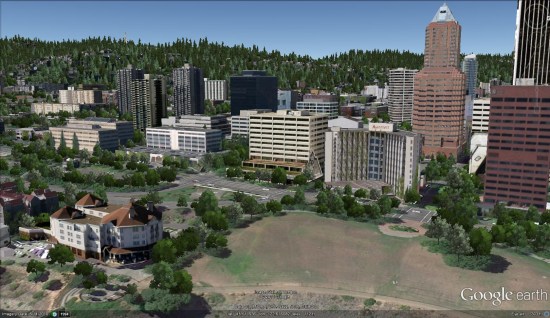
Google Earth: 3D trees in Portland, Oregon


Thanks to sharp-eyed GEB reader ‘Donovan’, it appears that Google has just released thousands of 3D trees in Portland, Oregon (and possibly some other cities).


portland-trees.jpg 

When Google Earth 6 was released, they included 3D trees in San Francisco, Chicago, New York, Athens, Tokyo and Berlin. In March they added trees to London in preparation for the royal wedding. In June, they added trees to Philadelphia, Boston, London and a few other cities in the California Bay Area. They followed that up in September with trees in Boulder, Denver and Los Angeles. Now we have Portland.

The tree releases have been fairly spread out, but this update comes barely a month after the previous release, so hopefully they’ll be rolling these updates out at a more rapid pace.

Google hasn’t officially announced this release, so there could be additional cities in there as well.

Google Maps: Preview your route in 3D

Getting directions is one of the most popular features on Google Maps, whether it be for driving, walking, biking or transit. Today, we are launching a new feature that allows you to bring your upcoming trip to life, by allowing you to preview your route in 3D.

Let’s say you’re planning a road trip down the beautiful coast of California’s Highway 1 and want to be able to see what the route really looks like. California’s rugged coastline is not to be missed, but the top-down view really doesn’t give you a good sense of what this majestic terrain is like. Using the 3D preview; however, you can get aerial view of the route, as if you were in a helicopter flying above the road.

To preview your own route, it is as simple as clicking on a button. Start by entering your starting point, destination, and mode of transport like any directions; in this case, driving directions from ‘Carmel CA to Big Sur CA.’ Then, just click on the “3D” play button. The map will switch to Earth view and automatically start flying you along your recommended route.

You can pause the flight at any time by clicking anywhere in the 3D view or on the pause button in the lower left. While the flight is paused, you can explore the surrounding area in 3D by clicking and dragging the map. When you are ready to resume the flight, simply click on the play button in the lower left of the 3D view.

To help you keep track of which step you are on, the current leg of the trip is highlighted in the left panel. You can also jump to a different part of the trip by clicking on a different step.

You can get back to 2D mode by clicking on the “2D” button in the left panel at any time.

Google Earth: New Imagery – August 14


Thanks to sharp-eyed GEB reader ‘Andreas’, it seems that Google has just pushed out a fresh imagery update. The full extent of the update is still unknown, but it appears to be quite sizable.


omaha.jpg 

As is usually the case, you can use Google Maps to determine for sure whether or not a specific area is fresh. This new imagery isn’t in Google Maps yet, so you can compare Earth vs. Maps to see what’s new; the fresh imagery is already in Google Earth, but the old imagery is still in Google Maps. If you compare the two side-by-side and they’re not identical, that means that you’ve found a freshly updated area in Google Earth!

[UPDATED - 13-August, 1:52pm EST]

  • China: Beijing, Shenzhen — thanks ‘drone’ and ‘hongxz’
  • Ethiopia: Gode — thanks ‘Snakeye’
  • United States: Arizona (Buckeye, Camp Verde, Casa Grande), California (Bakersfield, Coalinga, Huron, Sacramento, Visalia), Illinois (Harrisburg), Iowa (Des Moines, Sioux City), Missouri (Columbia, Jefferson City, Joplin), Nebraska (Lincoln, Omaha), New Mexico (Carlsbad, Farmington), New York (Rochester), Ohio (Dayton), Oklahoma (Tulsa), Texas (Abilene, Big Spring, Dalhart, Junction, Monahams) — thanks ‘Alex’, ‘Andreas’, ‘Munden’ and ‘Steven’

As ‘Munden’ points out in the comments, the imagery from the tornado that struck Joplin, MO is stunning:

joplin.jpg