Google Earth: 3D trees in Portland, Oregon


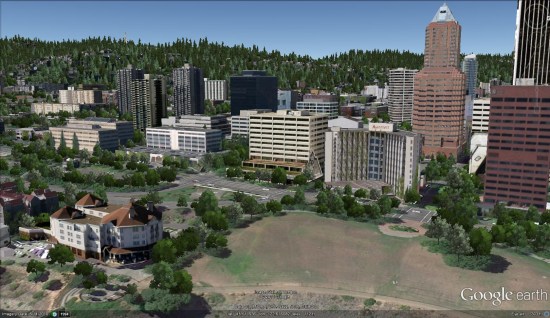
Thanks to sharp-eyed GEB reader ‘Donovan’, it appears that Google has just released thousands of 3D trees in Portland, Oregon (and possibly some other cities).


portland-trees.jpg 

When Google Earth 6 was released, they included 3D trees in San Francisco, Chicago, New York, Athens, Tokyo and Berlin. In March they added trees to London in preparation for the royal wedding. In June, they added trees to Philadelphia, Boston, London and a few other cities in the California Bay Area. They followed that up in September with trees in Boulder, Denver and Los Angeles. Now we have Portland.

The tree releases have been fairly spread out, but this update comes barely a month after the previous release, so hopefully they’ll be rolling these updates out at a more rapid pace.

Google hasn’t officially announced this release, so there could be additional cities in there as well.

Bing’s New Marketing Approach to Their Local Business Portal

Bing, in an effort to gain small business mindshare has rolled out a number of upgrades to their Business Portal. In addition to their mixed model approach to deals, they have added very interesting collateral generation capabilities, a loyalty program and a school fund raising program to help promote the effort.

The deals product offers a simple interface that allows a merchant to easily create their own deal from withn the portal in one of their 12 supported cities(currently Atlanta, Austin, Boston, Chicago, Dallas, Honoluly, LA, NYC, San Diego, SF, Seattle & Medford, OR).  Within 72 hours a local community manager will get in touch with the merchant to refine the deal to the market. The deals program currently offers that standard 50/50 merchant split (a mold waiting to be broken for sure). The flow allows for scalability AND individual counseling on deal creation in an effort to achieve both efficiencies and quality. It is an interesting mixed approach in an already crowded landscape.

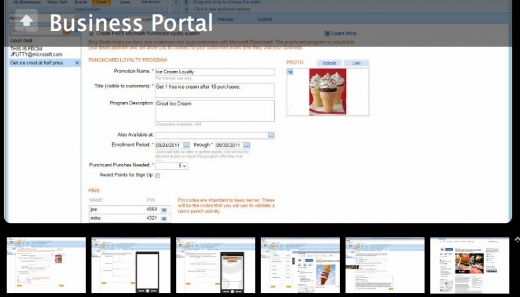
In an effort to try to increase the % of folks that return to an establishment after the deal (reportedly a lowly 19%), they have implemented  digital loyalty card program. Bing sees this feature as a significant differentiator and is included free as part of the deal creation. The consumer opts into the loyalty program at the time of the deal purchase. At the establishment the end user can scan a QR Code or visit their own deals page to initiate the loyalty card. The merchant enters a previously established PIN (or multiple PINS if it is desired to track by salesperson) on the customer’s smartphone at the time of purchase as verification. Obviously this feature raises visions of future marketing possibilities that Bing is considering.

Apparently Medford OR was included because there Bing tested using the school PTA to promote the deals program as a school fundraiser. The school can either recruit new businesses into the program or just promote existing deals and will receive a percentage cut of both types of transactions. The specifics of the actual percentages are still being worked on but the idea of using local school fund raising efforts to promote deals is an interesting twist in the marketing of deals that leverages the very real and active social networks of the school fund raising environment to both create more deals and have a motivation to spread them.

Historically local business dashboards have been used to capture data from the merchant in the form of basic listing information, events, promotions etc. But Bing has taken that one step further in attempting to attract the small business to not just come to the portal but to come back frequently. Bing has added a very slick collateral creation process that leverages each of the specific data types to create related collateral materials with minimal effort.

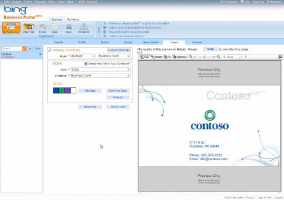
For example Bing has added the ability to create a business card from your listing data and uploaded logo, a post card that can be used to promote your event, ceiling danglers for promotions and tents and posters for the loyalty program. The software automatically suggests complimentary colors based on your logo colors or allows you more manual control. It creates both a file that you can print or take to a service bureau or facilitates your interaction with the local Office Depot for printing of all materials except the business card. More printing partners are apparently in the works. As Bing noted they are “Creating a value proposition around allowing the merchant to not just verify accuracy, they can now use the data to do the things a business already doing but doing it easier”.

The interface was very slick and the ability to create related collateral materials is incredibly useful. I think we are seeing the future of what the business portal needs to become to attract and retain small businesses – a one stop shop for a complete range of offline AND online marketing and advertising options.

To view a slide show of screen shots of the new features click the image:
Garmin Chicago gives away a Nüvi

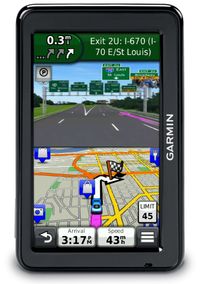
It seems like each day more and more of our social lives become location-based. You  can check in here, tag your friends there, or even sign-up for location-based deals. As a company whose products are location-centric, we totally get where you’re coming from (and we like helping you get where you’re going to). So when we heard about theReady to Move You nüvi 2012 line-up, we thought, let’s reward ourFacebook and Twitter friends who love Garmin just as much as they love checking in.

We’re giving away a nüvi in our 2012 advanced series to whichever of you is the foursquare mayor of the Garmin Chicago Store the moment those models hit our shelves! All you have to do is stop by the store on Michigan Avenue, check in – often – and follow @Garmin_Chicago on Twitter for updates.

We can’t say exactly when we’ll get these new models – which feature Guidance 2.0 with 3D Traffic and photoReal Junction View – but we’re pretty sure it’ll be mid-September. So you’ll want to be sure you’re checking in as often as possible. Remember, only one person can be mayor at the time, and whoever that is when the official “in-stock” update goes out over Twitter will win!

Google Map Maker & Chicago

(Cross-posted from the Student Blog)

The Google Map Maker campus tour recently visited the Windy City to talk to students about how they can use Map Maker to map their campuses and make updates to places they care about on Google Maps. While in town, we also hosted a Map Maker event at the Google Chicago office to share the tool with folks working in the public sector. We had a great time meeting so many enthusiastic mappers from the area, and look forward to seeing how they put Chicago on the map.

Our first stop was the University of Chicago campus, a beautifully historic area with architectural gems galore. Students who attended this event were excited to map not only their campus, but neighborhoods near the university, showing the diversity and development of the population and culture.

Our second stop was Northwestern University, where a packed room of students learned about mapping while sampling some traditional Chicago style deep dish pizza. Delicious! Students were particularly interested in adding details to their campus, naming the buildings, adding locations of the sororities and fraternities, and marking the building outlines or footprints of their favorite restaurants and stores nearby.


Our Google Map Maker team loved partnering with Google Student Ambassadors from these campuses, who creatively and passionately helped plan these events. You guys did an amazing job! The Google Student Ambassadors from Northwestern University had this to say about the Map Maker visit:

“Our event brought together over 120 Northwestern students who were eager and excited to learn about how they could make an impact by adding to Google Maps using Map Maker … Map Maker was a welcome product that put the power to shape the map in our hands. All in all, it was an incredibly fun and engaging experience!”

-Sourya and Minjae, Google Student Ambassadors at Northwestern University

The last event—a meeting with public sector officials at the Google office in Chicago—gave us some great insights about how Map Maker can be used for large metropolitan areas. University educators, Department of Transportation employees, Census Bureau representatives, Chicago Health Department folks, and many more shared how they would like to see Map Maker applied to what they do. We really appreciate all their feedback and suggestions, as well as their enthusiasm for how this tool can help them share their work with each other and the public.

Chicago and the surrounding areas were such enjoyable places to visit, full of vibrant and passionate people. We look forward to visiting other campuses in the fall, but don’t wait until then to leave your mark on your campus!

Google Map Maker: Map the Midwest

During one of the Map Maker Community team’s recent college campus events in Chicago, we had the pleasure of meeting Phil Swanson, an international studies and business student, who travelled nearly 200 miles to join our mapping event at the University of Chicago.

As soon as we started talking with Phil, his passion for mapping and computers came shining through, so we were excited to learn more about what drives him to add to, edit, and create using Google Map Maker.
According to Phil, it all started with retrofitting an interactive campus map when he was a web developer at the University of Wisconsin, Platteville. There was an existing version that utilized the Google Maps API, which he further developed, resulting in this useful campus map. Phil says about the project, “I love to make simple things for people to use, and I’ve always been interested in maps, so that project definitely created an interest in maps and mapping in general.”


Once Phil realized the positive impact his mapping could have on the university, he continued using Google Map Maker to ensure all of the campus details were correct. He began seeing his edits appear not only in Google Maps, but also on Google Maps for mobile on his phone when he searched maps near the university. “Seeing edits transition from Map Maker to Google Maps on mobile and filling in the details make maps that much more useful for me and the world,” Phil said about mapping his town and the campus.


What aspect of the maps does Phil enjoy most? “I love mapping buildings. Seeing the buildings from my University show up on my phone is the best.” Phil has developed a handy system of finding what needs to be fixed on the map, going out with his phone to take pictures, then adding those photos to a web album which he can then include with his edits in Map Maker. “This is especially useful for buildings . . . . It might sound obvious, but I find that my edits are much more likely to get approved if I describe what I’m doing and link to a photo for a more complex edit.” What a helpful technique to use during the review process!

We want to thank Phil for taking the time to hang out with us in Chicago, and also for sharing with us what excites him about mapping. We look forward to seeing more great mapping from Phil, and hope other students are inspired to make the maps of their own colleges and universities more comprehensive and detailed!

For more useful tips like Phil’s, visit the Map Your World Community forum to see what others are doing.