Mixi’s new platform feature: "Apps for Touch"

We are happy to announce that a smart-phone platform has been launched on mixi Platform.

mixi Platform supports OpenSocial v0.8.1 and have executed applications for two devices “PC desktop” and “Japanese feature-phones” last year. The specification of our feature-phone platform has been proposed as the “OpenSocial WAP extension”, and this specification has been adopted by other platforms in Japan. If you would like to know more, please check the link below:

Recently, we have launched a new feature to mixi Platform. We call it “mixi apps for Touch”. The saturation level of smart-phones is currently increasing in Japan as many people already use the iPhone, and there are many release plans of smart-phones based on Android. Currently, 17 applications have already been launched as mixi apps for Touch, and these developers have attracted many users. The below image is the screenshot of one mixi application executed on the smart-phone. A single mixi application can support three devices — PCs, feature-phones and smrt-phones at same time.


Figure 1. Screenshots of mixi apps for Touch

Basically, mixi apps for Touch is a Web browser based application and is not a native iPhone/Android application which you download from an application market/store. Technically, the view name of mixi apps for Touch is “touch”, and the value of the type attribute is specified as “url”. This definition is written in gadget spec file with definitions for other devices. The below image is the architecture to describe mixi apps for Touch.


Figure 2. Architecture of mixi apps for Touch

The application is executed in the iframe placed on mixi’s page. One of mixi app’s features is that the domain in the iframe is not mixi’s domain, and is of the developer’s server. Therefore, application developers can generate the contents on his/her server similarly to developing a general web site.

Developers need the OpenSocial RESTful API to use social data, and a 2-legged OAuth is adopted to the authorization mechanism. On the other hand, when developers want to use APIs (invitation, posting activity, and etc) with a user-flow (need to show Popup window), a JavaScript file provided by mixi Platform is loaded by using a script tag. The function written in the script file calls the function which exists on the parent frame, and the user-flow will be executed. Of course, Payment and Ad programs are available for monetization (the Payment API is based on OpenSocial Virtual Currency API).

We believe that our platform will be able to bring OpenSocial more scaling to many devices. For more information, please visit our developer’s site “mixi Developer Center”.

For more information, please visit the mixi Developer Center.

Posted on behalf of Yoichiro Tanaka, mixi, Inc., by Mark Weitzel, President, OpenSocial Foundation

Google Developer Days: Meet the Google Geo Engineers

Posted by Mano Marks, Google Geo APIs Team

Google Developer Days 2008, a set of one-day developer events, are back and will take place in locations around the world. We’ve designed these events for developers with strong coding backgrounds, so that we can discuss our APIs, developer tools and applications.

We’ll host Google Developer Days in these locations:

  • Yokohama, Japan (June 10)
  • Beijing, China (June 12)
  • Taipei, Taiwan (June 14)
  • Sydney, Australia (June 18)
  • Mexico City, Mexico (June 23)
  • Sao Paulo, Brazil (June 27)
  • London, UK (Sept 16)
  • Paris, France (Sept 18)
  • Munich, Germany (Sept 23)
  • Madrid, Spain (Sept 25)
  • Milan, Italy (Oct 21)
  • Prague, Czech (Oct 23)
  • Moscow, Russia (Oct 28)

If you’re based in the US, we encourage you to come to Google I/O, on May 28-29 in San Francisco.

At Google Developer Day, our Maps and KML engineers will share their inside knowledge on our developer tools and APIs, including the Google Maps API and KML. In many locations we’ll do deep dives into code and conduct hands-on codelabs. If you come to Yokohama and Mexico City, say hi to me and Pamela Fox.

We’ve posted detailed information for our early dates and will be adding more information for other locations soon. If you’re a developer, we encourage you to sign-up for a Google Developer Day at a nearby location. I hope to see you there.

We’re Going to Google I/O!

Posted by Mano Marks, Geo APIs Team

I’m getting excited about Google I/O May 28th & 29th in San Francisco. The reason I’m excited is that many of you will be there too, and it will be a great chance to meet. Google I/O is like the Google Developer Day we had last year, which in turn was based on Google Geo Developer Day, which we had two years ago. This year, there will be a whole track on Maps & Geo, including KML, Maps, and Mapplets. There will, of course, be other tracks, AJAX, APIs & Tools, Social, and Mobile. Both Pamela and I will be there, along with all the Google Geo stars.

The event won’t be limited to just Google APIs and developer tools. There is a lot of knowledge about web development in general at Google, and we’d like to share that expertise so that all applications on the web get better. And of course, we’re focusing a lot on Open Source tools, like the new libkml (more about that in a later post).

Over the two days of Google I/O, Google engineers and other leading software developers will share their knowledge in breakout sessions, hands-on Code Labs, and Q&A Fireside Chats. That’s your chance to sit down with Google engineers and ask all the questions you’ve ever wanted to, as well as meet each other.

Visit the Google I/O website to learn more and register. Space is limited, so be sure to make plans to attend now.

And after Google I/O, we’ll be doing other developer days all over the world, so if you can’t make it to SF, hopefully you can make it to one closer to you.

Android Market Action

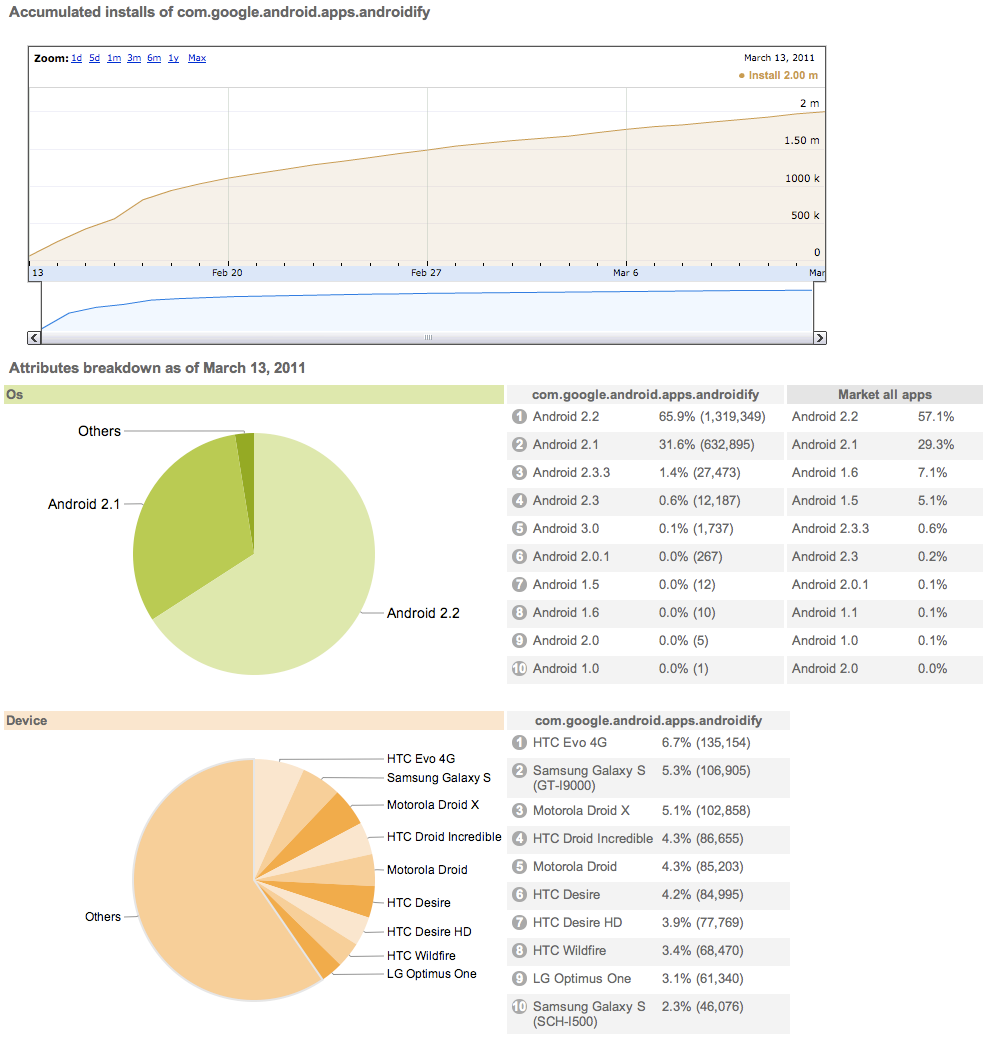
Almost instantly after I joined Google, it became obvious to me that the number-one area where Android developers wanted to see action and progress was in Android Market; your concerns in this area vastly outweighed whatever issues might be bothering you about the handsets and the framework and the programming tools. In recent months there has been a steady, quiet, incremental flow of improvements and upgrades. They add up. This is by way of a glance back at developments since the arrival of Froyo last summer.

First, we introduced error reporting to Market, so developers can see if their apps are locking up or crashing; and if so, exactly where.

Second, we upgraded the Market publisher site to include user comments, so you can read what people are saying about you, or at least what they’re saying in a language you understand.

Third, we added the licensing server, which, when used properly, tilts the economics of Android apps toward you, the developer, and against the pirates.

Fourth, we cranked up the number of countries people can buy and sell apps in: as of now, you can sell them in 29 countries and buy them in 32.

Fifth, we rolled in a “recent changes” feature, a place for developers to put their release notes. Android Market has a zero-friction process for app update, and the really great apps have followed the “release early, release often” philosophy. As a developer, I like having a place to write down what’s behind an app release, and as a person who downloads lots of apps, I like to know what the goodies are in each new update.

Sixth, Market now has a “draft upload” feature; this removes a lot of the tension and strain from the app-update process. Get your screenshots and feature graphics and text and APK all squared away with as much editing as you need to, then update them all with one click.

You’ll notice that I didn’t say “Sixth and last”, because this is a team on a roll and I expect lots more goodness from them; if you care about the larger Android ecosystem, or are already a developer, or are thinking of becoming one, stay tuned to this channel.

Search your geo data using spatial queries from Fusion Tables!

I’m Kathryn Hurley, a Developer Programs Engineer for Fusion Tables, and I have to say, I really dig Fusion Tables. The power it gives you to visualize your data is amazing! Plus, the team is working hard to add new features that give even more power to you, the developer.

It is my pleasure to announce that Fusion Tables now offers spatial queries! Using spatial queries, developers can (1) find all features that are located within (or overlap with) a given distance from a location (2) find all features that are located within (or overlap with) a given bounding box, and (3) find a given number of features closest to a location.

To demonstrate some of the new syntax, let’s go through a potential use case of spatial queries: creating a store locator map. For this demo, I set up a table in Fusion Tables, 297050, containing the locations of a fictitious pizza restaurant chain in the San Francisco bay area. The table contains the name, location, and whether or not that location delivers.

Now let’s say we want to display all the restaurants that fall within a bounding box. To do so, use the syntax:

SELECT * FROM 297050 WHERE ST_INTERSECTS(Address, RECTANGLE(LATLNG(37.2, -122.3), LATLNG(37.6, -121.9)))

The map to the left shows this query in action using the FusionTablesLayer. The example shows all rows in the pizza table that fall within the bounding box specified with a lower-left coordinate of 37.2, -122.3 and a upper-right coordinate of 37.6, -121.9.

This is the code for the FusionTablesLayer:

map = new google.maps.Map(document.getElementById('map_canvas'), {
   center: new google.maps.LatLng(37.4, -122.1),
   zoom: 10,
   mapTypeId: google.maps.MapTypeId.ROADMAP
});
tableid = 297050;
layer = new google.maps.FusionTablesLayer(tableid, {
   query: "SELECT Address FROM " + tableid + " WHERE ST_INTERSECTS(Address, RECTANGLE(LATLNG(37.3, -122.3), LATLNG(37.6, -121.9)))",
   map: map
});

We can also find the 10 features closest to a particular coordinate, such as the latitude, longitude coordinate of your house or a major city center. To find the 10 nearest features to Mountain View, CA at coordinate 37.4,-122.1., we use the syntax:

SELECT * FROM 297050 ORDER BY ST_DISTANCE(Address, LATLNG(37.4, -122.1)) LIMIT 10

These 2 examples demonstrate how to create a store locator-like map, but the possibilities are endless! You could create an application that finds the most popular bike trail routes in your area or enable crowd sourcing to identify roads that might need more street lamps.

To learn more about the full spatial query offering in Fusion Tables, please see the Fusion Tables documentation. You can also join the Fusion Tables User Group to receive announcements about new features or post questions you might have about Fusion Tables. Or follow us on Twitter: @GoogleFT. And, most importantly, have fun creating awesome apps!

Posted by Kathryn Hurley, Google Geo Developer Relations