Google Street View is mapping Bulgarian streets soon

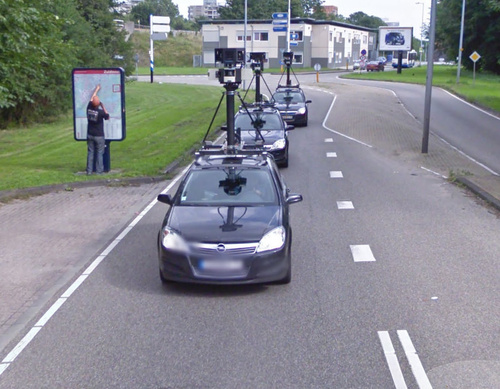
Google is now ready to finally begin touring the streets of Bulgarian cities and towns, a report by website dnevnik.bg claimed on February 14.

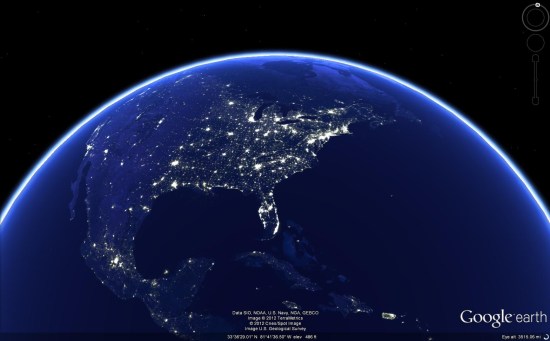
Google Street View, which offers panoramic views from a particular spot alongside a street, can be used both through Google Maps and Google Earth applications.

It was unclear which cities Google’s camera cars will tour first, but the list of destinations included all the major cities – Sofia, Varna and Plovdiv – as well as about 70 towns. The list included all of Bulgaria’s major winter (Borovets, Bansko, Pamporovo) and summer resorts (Slunchev Bryag, Zlatni Pyassutsi, Balchik and Sozopol, among others), as well as historical towns like Koprivshtitsa and Melnik.

As is in other countries, Google will blur out faces and licence plates of cars caught on camera. Separately, people will have the option to ask Google to blur out photos of their property if they so desire.

The report did not specify an expected date for when street views of Bulgarian cities and towns would be available, given that it will take several months to process the photos and string them together.

Google Earth: High-resolution imagery in Antarctica

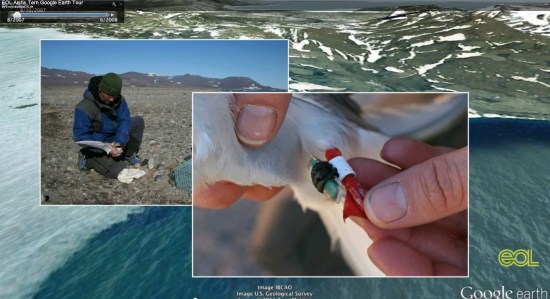
As Google has continually improved the quality of their imagery across the globe, one area always seemed to stay low-res — Antarctica. Thanks to the help of the Polar Geospatial Center (PCG), that’s beginning to change.

A great example of that is the Mackay Glacier Tongue, located in Granite Harbor, seen here:

mackay.jpg

You can see it for yourself, as shown in the article, using this KML file.

So far, the PGC has helped Google update nearly 1,000,000 square kilometers, with another 275,000 square kilometers added every three months. While it will take a while to get the entire continent updated (more than 14,000,000 sq km), they’re certainly making great progress.

Along with updating the quality of the imagery, they’re also working to improve the accuracy of the location of the imagery. The PGC’s Paul Morin will be heading down to the Antarctic Peninsula soon to help improve the imagery from being off by as much as 30 meters to being accurate within a single meter.

The full article at The Antarctic Sun is quite interesting and well worth your time to read. We all enjoy the constantly improving imagery quality in Google Earth, and the PGC is just one of many companies working with Google to help move things forward.

(via @OgleEarth)

Garmin Smartphone Link for Android


Keeping you connected and on the right track is what today’s announcement of the launch of Smartphone Link, the first Android app to provide live services to personal navigation devices (PNDs) is all about. Smartphone Link creates a seamless navigation experience between any Bluetooth® enabled 2012 Garmin nüvi and an AndroidTM smartphone allowing them to communicate and share data. Among other functionalities, the app lets nüvi users add live services, such as traffic information, traffic camera images, weather and fuel prices to their navigation device, utilizing the smartphone’s mobile data plan. Garmin Smartphone Link is available at no cost in the Android Market and includes several free live services as well as premium content available through subscriptions.

“Garmin Smartphone Link solves the problem of having to pay for an extra data plan to use live services on a PND by utilizing the existing connection of a smartphone,” said Dan Bartel, Garmin’s vice president of worldwide sales. “It is a great example of how smartphone apps can complement navigation devices, which offer key benefits such as bigger screens and better GPS reception.”

Free connected services include live weather information and myGarmin™ messaging, which provides update notifications and special offers from Garmin. Premium Live Services include the following:

Live Traffic ($19.99 per year): Garmin Live Traffic provides the best-in-class real-time information to help users navigate in and around congestion. Live Traffic is updated every two minutes and receives more than 1,000 messages every update cycle, including details of traffic incidents, road conditions and del ays. It covers major highways, interstates and main roads.

photoL ive traffic cameras ($9.99 per year): This functionality is an addition to Garmin’s Live Traffic feature and provides drivers the ability to literally see traffic conditions ahead of time. It lets users easily look up real-time photos from traffic cameras to get a glance at traffic and weather conditions. Included are more than 10,000 traffic cameras across the U.S. and Canada that send images every couple of minutes.

Fuel Prices ($9.99 per year): Users can find the best prices for any grade of fuel in their area by tapping the screen and selecting a station.

Advanced Weather ($4.99 per year): Get current and 5-day forecasts tailored for major cities in the U.S. and Canada. In addition to what the free weather service provides, Advanced Weather also allows users to receive severe weather alerts and view animated radar images on a map. Colors distinguish types of precipitation such as rain, snow and ice, to help you avoid bad driving conditions.

In addition to using Garmin Live Services, Smartphone Link allows the Garmin GPS to share its favorite locations with the phone. And better yet, the app can help users find their way from a parking spot to their destination and back by displaying both on a map.

Garmin Smartphone Link works with all Bluetooth enabled 2012 Garmin PNDs, the nüvi 2475LT, 2495LMT, 2595LMT, 3490LMT and the all-new 3590LMT, the company’s most feature-packed 5” navigator. All of these models require a software update, except the nüvi 3590LMT. Garmin Smartphone Link is available from the Android Market at no cost. To learn more, go to http://sites.garmin.com/smartphonelink.


Celebration Town


While Disney is famous for their theme-parks, did you know that they also built a town? Google Sightseeing takes us on a brief tour of Celebration, the town that Disney built in the mid-1990s.


celebration.jpg 

The city was was designed around its downtown, to encourage walking rather than driving. The town has some very cute buildings it in, such as the post office seen below. However, Disney was careful to keep it generically cute, and not include any Disney-like features such as Mickey Mouse ears or Dumbo-shaped bushes.


post-office.jpg 

Once complete, as planned, Disney sold the town to a property investment corporation. You can learn more about the city on their official website.

As they typically do, Google Sightseeing has created a KML file to showcase all of the locations found in their post. The city has sharp aerial imagery from 2010 and very comprehensive Street View imagery, making it a fun town to explore in Google Earth!

Doodles for Google Apps


Since 1998, when the first doodle was released, they have been one of the most loved features of the Google home page. There have been doodles to celebrate all kinds of events, including national holidays, birthdays of artists and scientists, sports competitions, scientific discoveries and even video games! Also, doodles have evolved from simple static images to complex applications, such as the interactive electric guitar used to celebrate the birthday of Les Paul.

Want your company logo to change for selected events or holidays, just like doodles? The Admin Settings API allows domain administrators to write scripts to programmatically change the logo of their Google Apps domain, and Google App Engine offers the ability to configure regularly scheduled tasks, so that those scripts can run automatically every day.

With these two pieces combined, it is pretty easy to implement a complete solution to change the domain logo on a daily basis (assuming the graphic designers have prepared a doodle for each day), as in the following screenshot:


Let’s start with a Python App Engine script called doodleapps.py:

import gdata.apps.adminsettings.service
from google.appengine.ext import webapp
from google.appengine.ext.webapp import util
from datetime import date

class DoodleHandler(webapp.RequestHandler):
  # list of available doodles
  DOODLES = {
    '1-1': 'images/newyearsday.jpg',
    '2-14': 'images/valentinesday.jpg',
    '10-31': 'images/halloween.jpg',
    '12-25': 'images/christmas.jpg'
  }

  # returns the path to the doodle corresponding to the date
  # or None if no doodle is available
  def getHolidayDoodle(self, date):
    key = '%s-%s' % (date.month, date.day)
    if key not in self.DOODLES:
      return None

    return self.DOODLES[key]

  # handles HTTP requests by setting today’s doodle
  def get(self):
    doodle = self.getHolidayDoodle(date.today())
    self.response.out.write(doodle)

    if doodle:
      service = gdata.apps.adminsettings.service.AdminSettingsService()
      // replace domain, email and password with your credentials
      // or change the authorization mechanism to use OAuth
      service.domain = 'MYDOMAIN.COM'
      service.email = 'ADMIN@MYDOMAIN.COM'
      service.password = 'MYPASSWORD'
      service.source = 'DoodleApps'
      service.ProgrammaticLogin()

      # reads the doodle image and update the domain logo
      doodle_bytes = open(doodle, "rb").read()
      service.UpdateDomainLogo(doodle_bytes)

# webapp initialization
def main():
    application = webapp.WSGIApplication([('/', DoodleHandler)],
                                         debug=True)
    util.run_wsgi_app(application)

if __name__ == '__main__':
    main()

The script uses a set of predefined doodles which can be edited to match your list of images or replaced with more sophisticated logic, such as using the Google Calendar API to get the list of holidays in your country.

Every time the script is triggered by an incoming HTTP request, it will check whether a doodle for the date is available and, if there is one, update the domain logo using the Admin Settings API.

In order for this script to be deployed on App Engine, you need to to configure the application by defining a app.yaml file with the following content:

application: doodleapps
version: 1
runtime: python
api_version: 1

handlers:
- url: .*
  script: doodleapps.py

We want the script to run automatically every 24 hours, without the need for the administrator to send a request, so we also have to define another configuration file called cron.yaml:

cron:
- description: daily doodle update
  url: /
  schedule: every 24 hours

Once the application is deployed on App Engine, it will run the script on a daily basis and update the logo.