Visit mapmaker.google.com Together with other volunteer map makers, you can easily go into Google Map Maker and make changes to make the map reflect the real world for millions to see. So whether you want to add a new bike path, correct a business location, or map an entire city you can start with Google Map Maker
Refugee Camp at Ethiopia
In the wake of intense drought, the Horn of Africa is gripped by its worst famine in more than 60 years. Over 12.4 million people across Kenya, Ethiopia, Djibouti and Somalia are threatened with hunger and disease as they are unable to access basic survival means. UN agencies and other humanitarian organizations are rallying to support refugees on the move, particularly to the thousands fleeing Somalia. Valerie Amos, OCHA Emergency Relief Coordinator, has stated that “This will not be a short crisis.” The emergency is expected to persist at least three to four months, and the number of people needing humanitarian assistance could increase by as much as 25 percent. Fresh and accurate maps are among the many critical factors in assessing such a state of crisis, as they provide vital information to facilitate emergency response and planning. Thanks to the efforts of our satellite imagery partner, GeoEye, we now have high resolution imagery of locations with the most pressing humanitarian needs. This has made Google Map Maker community mapping efforts even more effective, by allowing the creation of improved maps over refugee camps in Kenya, Ethiopia and the city of Mogadishu. Volunteers are mapping roads, hospitals, schools, community centers, and water resources, among other vital landmarks. The map data contributed is being shared periodically with the UN agencies engaged in this crisis. Google has also donated 1 million USD to help local and international organizations provide famine and drought relief support in the Horn of Africa.
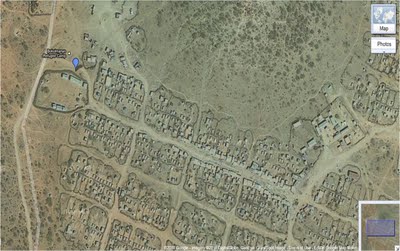
You can help the Horn of Africa during its time of crisis by creating detailed maps using your local knowledge of places, such as cities, roads, and natural landmarks. If you’re unfamiliar with the region, try pairing up with people who have local knowledge, who can help by reviewing and correcting your edits. To participate in these ways and more, and offer feedback, please join our Africa mailing list and visit the Horn of Africa community mapping site as we all map the way toward crisis relief.
Introducing Google Map Maker for the United States
Are you a local expert? Add detail to the places you know using Google Map Maker, now available for the United States. See mapping around the world happening right now at mapmaker.google.com or start mapping at mapmaker.google.com.
Google Map Maker in Pakistan
The month of June proved fruitful for mapping enthusiasts, tech buffs, and entrepreneurs throughout Pakistan as they gathered for a series of Google MapUps organized at universities in three major cities: Islamabad, Lahore and Karachi.
Led by Google Pakistan Country Consultant, Badar Khushnood and a trio of Pakistan’s Map Maker Advocates—Faraz Ahmad, Jabran Rafique and Omer Sheikh—the three events welcomed a total of 150 participants to learn the ins and outs of Google Map Maker. The intent of the MapUps was to guide new users through the process of mapping their cities and neighborhoods while stressing the importance of having a complete map of Pakistan available online.
Recent mapping efforts in Pakistan have been predominantly aligned with relief efforts following Pakistan’s 2010 floods and landslides, as demonstrated by Omer, Jabran and Faraz. Dr. Sayeed Ghani spoke at the Karachi MapUp about Sindh Flood Maps, his community-based geographic information system (GIS) that implements a Google Maps API to assist in disaster management. Dr. Sohaib Khan, who co-hosted the Lahore MapUp, has also focused on flood relief.
On a basic level, the aim of MapUps is to teach new and aspiring mappers the fundamentals of Map Maker, and to bring them together to map their community. Omer explained that “The idea is to get the participants started in the hope that they will continue mapping in the future.” Badar Khushnood and our Mapping Advocates ultimately highlighted the tools and motivation behind mapping, highlighting it as influential, inspirational, and humanitarian.
Google MapUp, NU-FAST, Islamabad, Pakistan
Learn more about hosting a Google MapUp in your own community, and be sure to visit our Advocates and other passionate and helpful mappers in our Map Your World Community.
Google Map Maker Updated Help Center
As part of ongoing effort to answer your questions about Google Map Maker, we’re introducing a newly designed Help Center. In the new Help Center, you can find clearly documented policies and information about how to make edits and review others’ edits.
This Help Center, available in 20 languages thus far, includes tips and tricks to help ensure that your edits get approved quickly. Where possible, we also provide a rationale for why you’re asked to fill certain attributes or make edits in a particular way.
In addition, we’ve organized the Help Center into five guides, each addressing a key aspect of Map Maker:
- Getting Started – Become familiar with the basic usage and functionality of Map Maker.
- Points: businesses, landmarks, and more – Learn how to add and edit places marked as points on Map Maker.
- Lines: roads, trails, railways, and more – Learn about adding and editing roads, trails and other line features.
- Shapes: buildings and boundaries – Discover how you can map locations such as your campus, buildings and other places as shapes.
- Reviewing options – Find out how you can become a Reviewer and keep track of the changes happening in and around your region.
Each user guide article follows a consistent format so that you can easily find and skip information with which you’re already familiar. Links to related articles are also provided where appropriate.
Please let us know if you have feedback about the new Help Center on the Map Your World forum, as that will help form our next round of improvements. Your tips and best practices for Map Maker are also most welcome.
You can get to the new help center via the Help link at the top right corner of Map Maker or visit http://www.google.com/support/mapmaker.
