Google Earth: View of the wedding procession

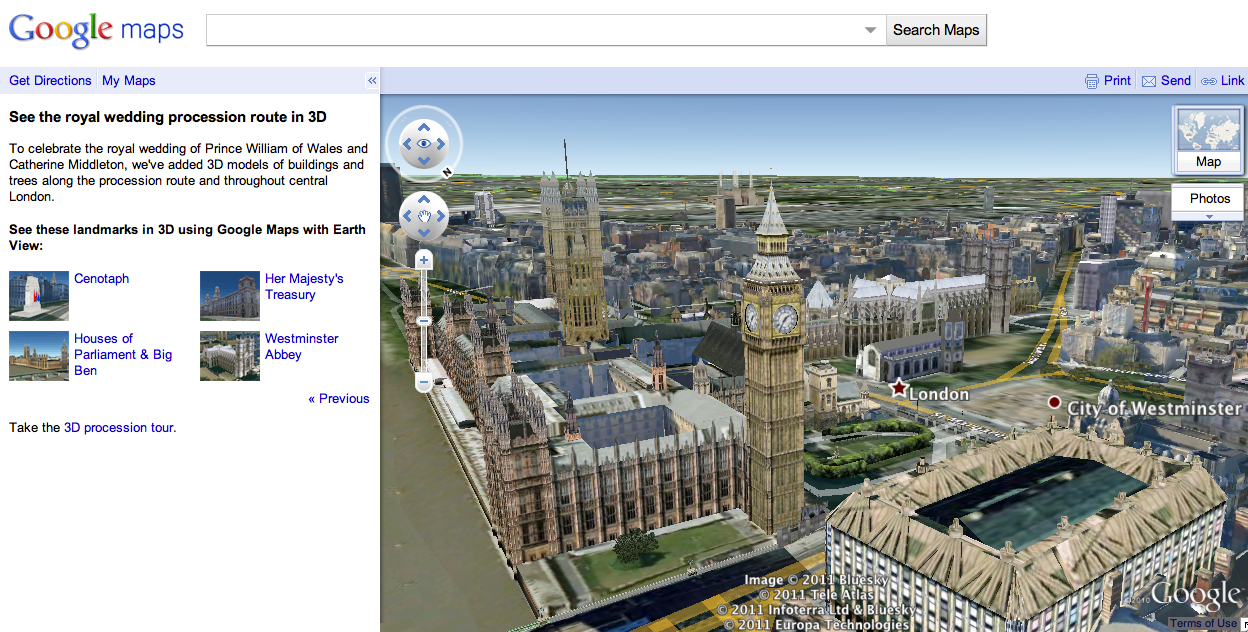
Connected with  the marriage of Prince William and Catherine Middleton, many locations in central London are in the spotlight. Last month we expanded our 3D imagery of central London’s buildings and trees in Google Earth to help you explore the royal wedding procession route.

As we get closer to the wedding day, we’ve also featured a few highlights along the procession route for you to explore in 3D using Google Maps with Earth View. If you have the Google Earth plug-in installed, you can get started viewing these spots though an immersive tour right away, or you can download the Google Earth plug-in to explore Google Maps in 3D.

With one click, you can travel to Buckingham Palace, fly to an aerial perspective of Westminster Abbey, or get a clock-level view of Big Ben and the Houses of Parliament. Get started seeing these and other highlights at maps.google.com/royalwedding.

Houses of Parliament & Big Ben, London

Whatever way you’re celebrating on Friday, we hope this rich data of London in Google Earth and Google Maps brings you that little bit closer to this historic event.

Google Latitude Adds Checkin Offers Nationwide

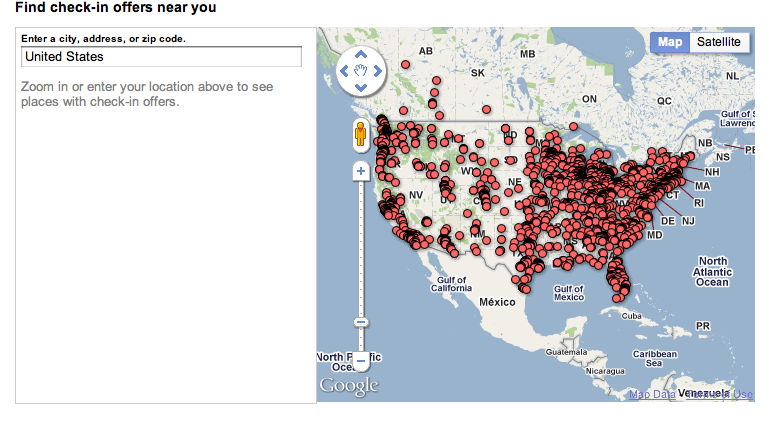
Yesterday was a busy day for Google local. Google management changes in Local & the Hotpot rebranding made front page news around the web. An announcement that snuck through the cracks was the limited nationwide rollout of  check-in offers at “thousands of places across the U.S. using Latitude on the iPhone and Android”.

Offers (aka Coupons) and Latitude have both been step children in the pantheon of Google local products….huge but unrealized potential month in and month out over a fairly long time horizon. But they both seem to have found each of late and are the better for it.

Coupons, now called Offers, a nearly hidden feature in Places for what seems like eons, have often languished. They got their start in July of 2006 and received some push into 2007. For a while there was appreciable annual growth in the numbers of coupons in the system. But doubts about Google’s willingness to promote coupons surfaced early. By early 2009, amidst no promotion from Google and their failure to showcase coupons in any significant way, Google’s coupon inventory showed significant year over year declines. None but the most intrepid consumers could find them and even SMBs that availed themselves of the feature had trouble locating their own coupons.

After hitting their low point in early 2009, Google Coupons slowly started receiving limited attention from Google, at first cleaning out old and stale inventory and then  very sloooowly adding features and slightly increased visibilty. In November 2009  mobile compatibility and in June 2010 SMBs were given the ability to highlight them on their listing via Tags, potentially giving them front page exposure.

Shortly before loosing out in their effort to acquire Groupon in November of last year, Google rebranded Coupons as Offers. A superficial change but one that indicated that coupons were no longer on life support.

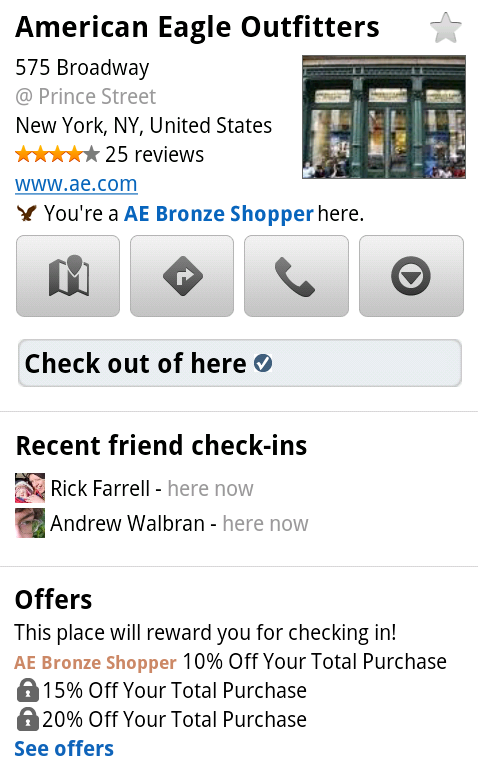
Google’s intended direction for the coupon aspect of Offers became clearer with a very public test in Austin concurrently with the South by Southwest Conference, integrating coupons with Latitude’s Check in process at 60 locations.  This newest expansion (details visible here) of offer checkins leverages some high value coupons at nationwide retailers and eateries:
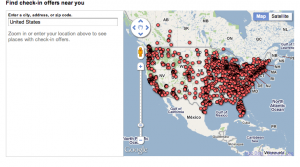
  • American Eagle Outfitters: Up to 20% off your total purchase
  • Quiznos: Free sub when you buy a sub of equal or greater value
  • Arby’s: Free regular roast beef sandwich with purchase of a 22 oz. drink
  • RadioShack: Up to 20% off qualifying, in-store purchases
  • Finish Line: Save $10 on purchases over $50

In January of this year a spot check showed that the coupon volume hadn’t changed since 2009 with as few as 500 coupon offers in a city like NY. However, a check today shows that NYC now has 770 offers. Still anemic, still not visible to the general public but no longer on life support and growing once again.

Check in coupons are a natural fit with a check in product and offer obvious synergies that could move both Offers and Latitude forward in adoption and visibility.

When and how these Offers will be made available to other merchants is unclear. Is it a paid or free test? What is the tests duration and when will it be made available more widely? Will it be available and affordable to retailers large and small? All unknown at this point. (Although I did send those questions off to Google).

Google, not always able to capture the value in their technology due to execution and priorities, is nothing if not persistent. That should be obvious by their recent surge to a dominant player in reviews after many years in the shadows. Coupons via Offers and Latitude appears to be on a similar path.

Will the marriage of Latitude and Offers be successful? Would you use it in your or your client’s business if it were available?
Rediscover Historical Imagery in Google Earth 6

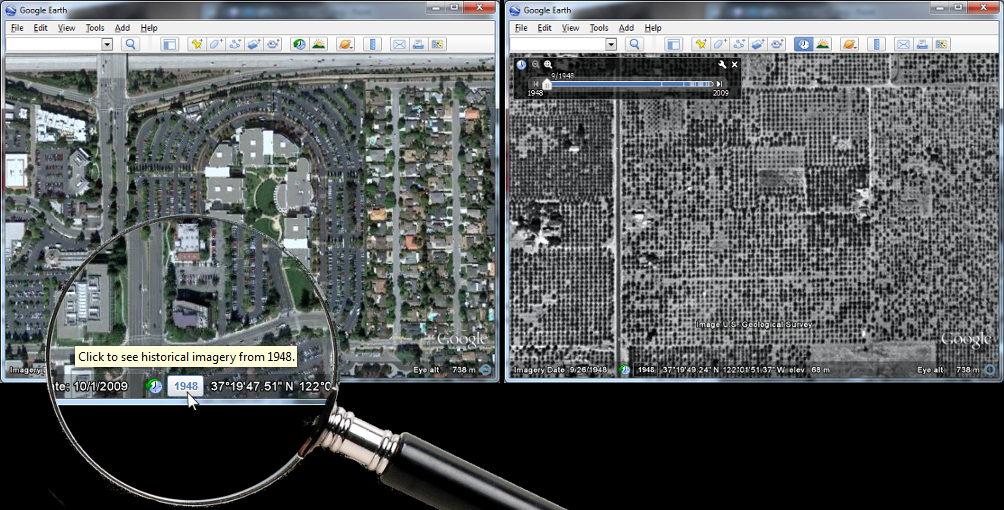
Historical imagery is one of the most powerful features of Google Earth, enabling you to go back in time and browse the visual historical record of our planet – from the evolution and rise of developing communities to the destruction caused by hurricanes, earthquakes and fires. With Google Earth 6, we’ve made it easier than ever to discover historical imagery. In addition to streamlining the timeline interface, we’ve added a date button to the status bar to notify you of past imagery that you might be interested in exploring. So now, when you zoom in on a location in our latest version of Google Earth, the button will appear highlighting specific years. Clicking it enables historical imagery and takes you back to the year you selected. For instance, when I zoom in on the headquarters of a certain company with a fruit namesake nestled in the heart of Silicon Valley, Google Earth suggests imagery from 1948. Clicking the date button reveals the fruit tree orchards that used to inhabit that very location. I wonder if they were apple trees.
Google Earth 6 suggests historical imagery to explore, e.g. of Silicon Valley in 1948
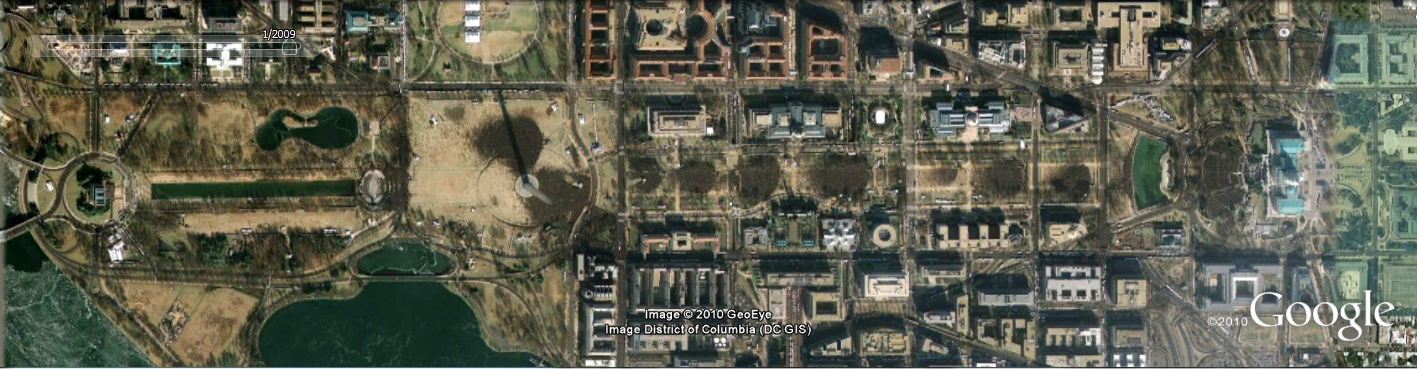
In the almost two years that historical imagery has been available, we have captured several moments of cultural significance, such as the inauguration of the first African American President of the United States, the devastation of Hurricane Katrina, and the transformation of South Africa in preparation for the 2010 FIFA World Cup.
Washington D.C., January 20, 2009. Can you spot where the jumbotrons were installed?
But the feature is more than just what historians deem significant. We built the historical imagery database to enable anyone to see and tell their own personal history. A great example comes from fellow historical imagery engineer Reuel Nash:

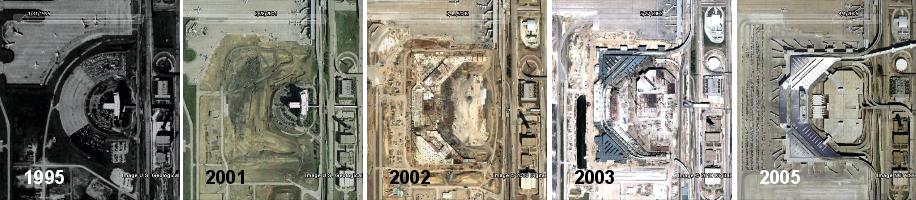
The construction of Terminal D at Dallas/Fort Worth International Airport
We have a vast amount of data in our historical imagery archive, so you’ll be able to tell your own personal stories by browsing those places that are special to you. In fact, we have more square miles of high resolution imagery in our historical imagery archive than in our default view. In the coming years, we look forward to expanding this imagery collection even further. Visit the Historical Imagery Showcase to watch video tours of cities with imagery dating as far back as 1940.
Posted by Chris Co, Google Earth Software Engineer

In 1979, my wife and I spent the first night of our marriage in a hotel at Dallas/Fort Worth International Airport. It was still there in 1995, which you can see in Google Earth. The hotel and the surrounding area has since been replaced by Terminal D. You can see the terminal construction (and destruction of the hotel) literally from the ground up using historical imagery.

Email 3 Times Daily

What if you checked email only 3 times a day?

The rules…

Check and handle email upon arrival then check and handle email at lunch. Check and handle email after 4 pm. At home, check it all you’d like (but hopefully that won’t be more than once a day).

Here’s what we’ve learned so far…

  • We recognized our addiction to checking email.
  • We identified how it’s become a default task (automatically checking it when returning from a discussion, meeting, trip to the bathroom, etc.).
  • We saw how we sometimes use it to hide out from our more important work (“If I’m addressing email, I’m doing something. It may not be important in the long term but at least I’m of use at this moment.” – Do you see the problem with this thinking?).
  • We learned that our email could wait* and that as the day came to an end, we were more productive and happier. (Although the first few days were very uncomfortable and had us oddly distracted by our lack of distraction.)

It’s cwazy**…

Why is it that we would allow ourselves to be distracted from what we rationally know to be our more important work that gets us closer to our goal of making good things happen?

Our next step here… Drop the morning check and look at it only twice a day. A few people have already passed out by thinking about it.

“The major problem of life is learning how to handle the costly interruptions. The door that slams shut, the plan that got sidetracked, the marriage that failed. Or that lovely poem that didn’t get written because someone knocked on the door.”

Martin Luther King, Jr. (1929–1968)
American civil rights leader
Nobel Peace Prize recipient

* Our customer service people check email hourly in order to be sure we’re addressing customer needs quickly. We don’t believe we’ve lost any sales and we’ve had no negative feedback on our response times.

** And if we still have your attention… This spelling of the word indicates a deeper level of crazy – so cwazy that we’d spell it cwazy. You think that’s crazy?

How?

This assumes you’ve already bought into the value of focusing on what’s most important to you and your people.

Start by…

  1. Turning off email alerts – audible and visual – for each time an email arrives
  2. Turning off automatic send and receives
  3. Setting up your email client to open to a page other than your inbox (e.g., in Outlook you can go to the “Outlook Today” page)

Checking email..

  1. Open email
  2. Hit send and receive
  3. Address what must be addressed
  4. Move or delete emails as appropriate
  5. Hit send
  6. Minimize or close email until next check

If you need to communicate or delegate something by email before your next check, this is where you can get tripped up.

If your email program allows it, open 5 – 10 blank emails during one of your email checks. When you need to type an email do it and hit send (sending it to your outbox). If you feel it really needs to be sent immediately, go in and hit send and receive and minimize the window quickly without giving attention to your inbox (we said it’d be tough).

Now, if you want that email addressed immediately, call the person who’s also trying to focus with you and let them know you’ve sent them an email that needs their attention now. (Of course, then they’ll need to be disciplined and focused in giving only your email attention when they hit send and receive.)

“Then why not just tell them over the phone instead of adding the email step?”

Good point. Perhaps you should have. It may have saved you the time of writing the email and been quicker for all involved (better chance to fully communicate through a real-life discussion rather than having something misinterpreted, which of course can happen in a discussion too). At the same time, maybe having to call and interrupt someone might keep you from doing it because you’re more apt to be giving care and attention to their time.

The big picture goal here really has nothing to do with email. It’s all about minimizing distraction, focusing, and helping all of us get closer to our goal of making good things happen (which is what you want).

Expect and enjoy more from your work. Make a decision to hold yourself to a standard that’s not standard at all.

Cross The Line.