How Google Earth is being used by the Philippine National Police


Over the years, Google Earth has been responsible for helping a huge number of non-profit and other worthwhile organizations around the world. We’ve shown you how environmental groups have been using Google Earth for more than six years, how it’s been used to fight against rainforest logging, and Google Earth Outreach consistenly showcases many other amazing organizations from a variety of countries.

Similarly to the others that have used Google Earth to fight against deforestation, the Philippine National Police have been using Google Earth to fight illegal logging in the province of Laguna.
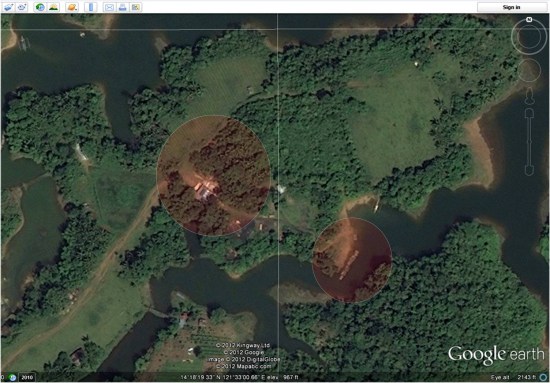
 

map2.jpg 

Here is their story, in their words:

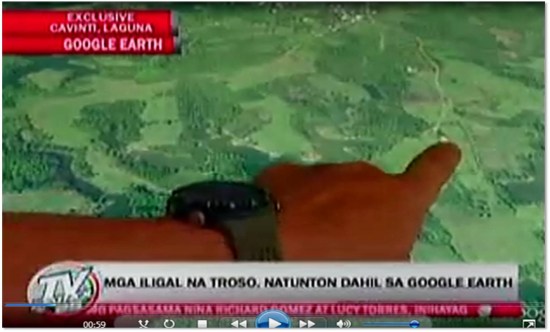
On behalf of all the personnel of Philippine National Police (PNP) Laguna, I would like to express our gratefulness for the wonderful gift of your Google Earth services. It contributed a lot and it has been a great part of our efforts against illegal logging here in the province of Laguna. Nationwide, we are shocked by the effect of the natural and man-made calamities wreaking havoc to our country resulting to loss of lives and properties. Man-made calamities are greatly attributed to rampant illegal logging and deforestation thus causing flash floods and landslides. Since Laguna had been one of the most affected areas of flash floods and landslides, the Laguna PNP initiated the creation of a dedicated Provincial Anti-Illegal Logging Task Group “BERDE” purposely to ensure the implementation of OPLAN “BERDE (Boost Economic Reserves for the Development of Ecosystem). Through the help of Google Earth, we were able to locate specific targets of our OPLAN BERDE. Our operations yielded positive results on illegal logging sites like Cavinti, Laguna that was identified by using Google Earth. Initial operation last April 13, 2012 resulted to the recovery of forest products, machinery equipment, tools and conveyance abandoned during apprehension. Google Earth has been a major contributing factor to the success of our operation. Because of you and your innovative services, we can keep moving forward towards the attainment of our goals in the field of law enforcement.

As Google Earth imagery continues to become higher resolution and update more rapidly, it will become an even more useful tool for organizations like this one.
 

Picture4.jpg 


Armstrong on Pushing Through


Pain is temporary.
Quitting lasts forever.”

– Lance Armstrong (1971 – )

American cyclist

7-time Tour de France champion

cancer survivor

In 1996, Armstrong was 25 (and ranked the No. 1 cyclist in the world) when he was diagnosed with testicular cancer that spread to his stomach, lungs, and brain. Doctors gave him less than a 40% chance of survival.

Two years later, after a miraculous recovery, he got back on a bike but quit a race in Paris realizing he wasn’t ready (ironic given today’s quote).

The following year (and the next 6), he won the Tour de France and retired as the only person to win it seven times.

London Riots Map: Visualising correlations on maps

Correlation is a statistical technique very often used in data analysis. It can show whether and how strongly pairs of variables are related. It normally involves lots of mathematical calculations but a quick insight into the phenomenon under investigation can be gained by simply superimposing the data on a map, if both datasets have a common spatial component (eg. location).

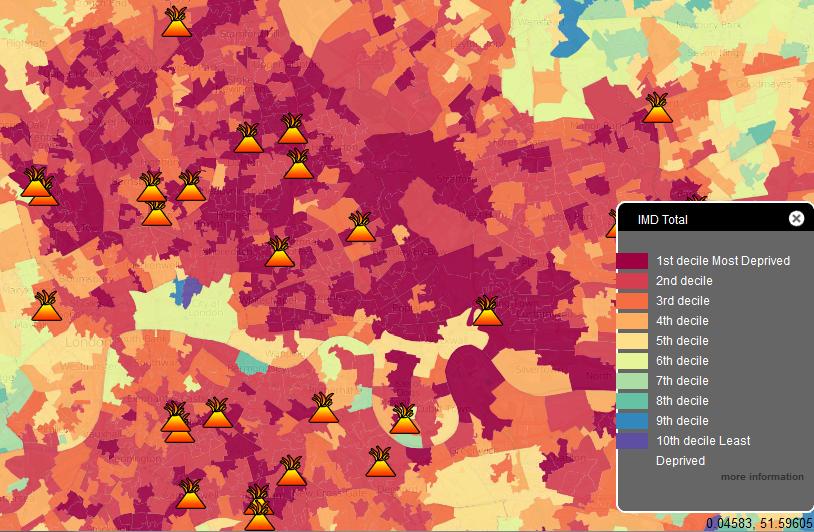
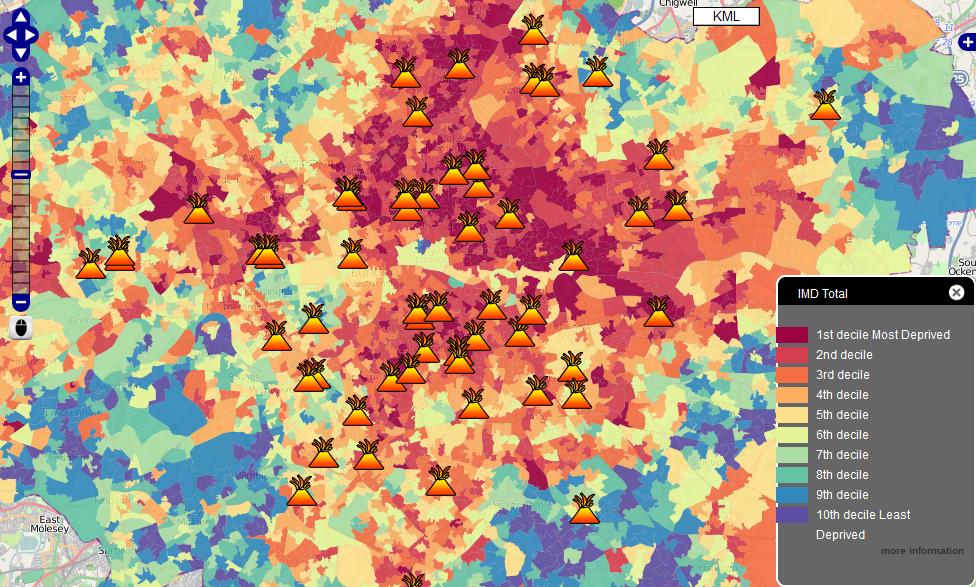
Take, for example, a case of recent London riots, mapped on MapTube. Overlaying locations of civil commotions with Index of Deprivation (ie. a measure of poverty) allows drawing a hypothesis that poverty and propensity to violent demonstrations are related. The correlation may not necessary be obvious when analysing each dataset in isolation and in a numerical form.

A point to note however is that, if the two variables are said to be correlated they may or may not be the cause of one another. In other words, correlation does not imply causality. The correlation phenomena could be caused by a third, previously unconsidered phenomenon, called a lurking variable or confounding variable. For this reason, there is no way to immediately infer the existence of a causal relationship between the two variables. Hence, one should not jump to the conclusion that “poverty is a major factor contributing to London riots” without examining the phenomenon in more detail.

As a side note, I am very surprised to see so much “red” on the London map, implying that the majority of central suburbs are poverty stricken areas – with only a few pockets of wealth on the city fringes. This picture is in big contrast to Sydney where underprivileged areas are concentrated mainly in the south-western part of the city and, most importantly, account only for roughly a quarter of the overall metropolitan area. Australia indeed seems to be a very lucky country…

London Riots Map first spotted on Google Maps Mania

Google Earth: The Harrisburg Capitol Complex


As I’ve mentioned on here on GEB a few times, I love high-quality 3D models. I think they add a lot to the Google Earth experience, and I enjoy highlighting users that create awesome models.

In the past we’ve shown you work from people like Andy Dell and companies such as Estate3D and CyberCity3D. Today I want to show you some of the work from Steve Cline of Urban 3D Modeling.


building.jpg 

He lives in Harrisburg, PA and built out much of the downtown area in 3D. In his words:

“As a resident of Harrisburg I wanted to show off the beautiful architecture and history of our state capitol complex. All the state government buildings are clustered into a dense complex that is bisected by State Street. The principle entrance from the east is the State Street Bridge which passes through two towering pylons as you enter directly into the Capitol Building and surrounding complex. Most of the complex buildings are a mix of neoclassical design and some art deco influence from the later additions. Of the 15 buildings in this collection my personal favorites are the Keystone Building, Judicial Center, and Forum Building. The only building not done by me was the previously done Capitol Building.”

You can find all of the models in Google earth, and he’s also put them together in a collection in the 3D Warehouse. For a quick look at all he’s done, you can use this KMZ tour to fly around and see it all.

For more on Urban 3D Modeling, you can check out their website, follow them on Twitter or connect with them on Facebook.

How to Convert Tile Coordinates

In addition to referencing tiles by quadkey, Bing Maps also refers to tiles by x, y, and z coordinates. This is the way you reference tiles when overriding the GetUri() method of the Silverlight Microsoft.Maps.MapControl.TileSource class, for example, and the x, y, z properties of a tile are passed to the uriConstructor function specified in the options for an AJAX v7 Microsoft.Maps.TileSource.

In the x, y, z tile identification system:

  • z is the zoom level of the grid
  • x and y are the column and row number at which this tile should be placed, measured from an origin at the top left of the map.

Thus, at zoom level 1, you can describe the four tiles required to make a complete Bing Map using x, y, z coordinates as follows:

image

Bing Maps is not entirely unusual in this respect – this exact same referencing system is used by Google Maps, Open Street Maps, ESRI, and many others. You’d therefore be forgiven for thinking that it was some sort of standard.

In fact, this tile numbering sounds a lot like (and is often incorrectly described as) a  TMS index. The Tile Map Service (TMS) Specification defined by the Open Source Geospatial Foundation is a standard for serving map tiles that, like the system described above, places tiles on a grid and refers to their position using x, y, and z coordinates, where z is the zoom level, and x and y refer to column and row positions. However, according to the TMS specifications, “The x-coordinate of the tile numbers increases with the x-coordinate of the spatial reference system, and the y-coordinate of the tile numbers also increases with the y-coordinate of the spatial reference system.”. In other words, tile (0, 0), at any zoom level should always be placed at the bottom left of the map, not the top left.

Using the TMS system, the tile indexes at zoom level 1 become as follows:

image

The problem is that, since these systems are identical in almost every other respect, people tend to assume that the system used by Google/Bing/OSM et al. is the standard and systems that output tiles using it sometimes mistakenly refer to it as the TMS format. Then,  every now and again, you come across a piece of software or service that genuinely outputs tiles numbered according to the TMS standard and, if you don’t correct the tile origin, your tiles all end upside-down on the wrong side of the world :(

Fortunately, it’s a very simple correction to make. At any given map zoom level, zoom, you can invert the y index of a tile from TMS to Google/Bing as follows:

var ymax = 1 << zoom;
var y = ymax - y - 1;

Assuming that you have a set of TMS tiles stored in a subdirectory structure that follows the pattern /z/y/x.png (as described in the Tile Resources section of the OSGeo TMS standard), then here’s a full example showing how to add a tilelayer of TMS tiles to Bing Maps v7:

<!DOCTYPE HTML PUBLIC "-//W3C//DTD XHTML 1.0 Transitional//EN" "http://www.w3.org/TR/xhtml1/DTD/xhtml1-transitional.dtd">
<html  xmlns="http://www.w3.org/1999/xhtml">
<head>
<title></title>
<meta http-equiv="Content-Type" content="text/html; charset=utf-8" />
<script type="text/javascript" src="http://ecn.dev.virtualearth.net/mapcontrol/mapcontrol.ashx?v=7.0"></script>
<script type="text/javascript">
  var map = null;
  function GetMap() {
    // Create a basic map
    map = new Microsoft.Maps.Map(document.getElementById("mapDiv"),
      { credentials: "ENTERYOURBINGMAPSKEY",
        center: new Microsoft.Maps.Location(52.6, 1.26),
        zoom: 12
      });

    // Create the tile source
    var tileSource = new Microsoft.Maps.TileSource({ uriConstructor: getTMSTilePath });

    // Construct the layer using the tile source
    var tilelayer = new Microsoft.Maps.TileLayer({ mercator: tileSource, opacity: 1 });

    // Push the tile layer to the map
    map.entities.push(tilelayer);
  }

  function getTMSTilePath(tile) {

    var x = tile.x;
    var z = tile.levelOfDetail;
    // Invert tile y origin from top to bottom of map
    var ymax = 1 << z;
    var y = ymax - tile.y - 1;

    return location.href.substring(0, location.href.lastIndexOf('/')) + "/" + z + "/" + x + "/" + y + ".png";
  }
</script>
</head>
<body onload="GetMap();">
  <div id='mapDiv' style="position:relative; width:1024px; height:768px;"></div>
</body>
</html>

As a final note, just to add to the confusion, the Web Map Tile Service (WMTS) recently published by the OGC provides an alternative standard to TMS, but, like Google/Bing, uses an origin at the top-left hand corner.