Google Places: Updated Bulk Upload Tool

Google Places has rolled out a new Google Places Bulk Upload Tool. Here are two videos, the first is for already bulk upload verified users explaining differences from the current tool and the second is a tutorial for new users explaining the tool in detail:

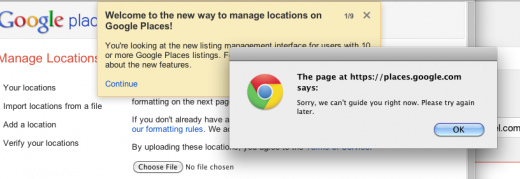
When you log into the upload feature inside of the Dashboard there will be a 9 page tutorial about the new features however it is not yet working:
Bing Maps: BlackBerry PlayBook – How To Demo (Official Demo Video)

(Official BlackBerry® PlayBook™ Demo) Learn how Bing Maps on your BlackBerry PlayBook can find your location, give you directions and more! To view more BlackBerry PlayBook demo videos, visit: demos.blackberry.com/playbook

http://www.youtube.com/v/G17Zq2UdqwY?version=3&f=videos&app=youtube_gdata

Introduction to ArcMap 10

This tutorial will familiarize ArcMap beginners how to use ArcMap 10. Topics include opening projects, the organization of the data view, adding data to the project, using tools and toolbars, and saving projects in different ArcMap version formats.

http://www.youtube.com/v/hqHCJUudPvs?version=3&f=videos&app=youtube_gdata

How to install Garmin gmapsupp.img in MapSource tutorial

Here is an instruction for installing of Garmin gmapsupp.img for viewing in MapSource


1. Download MapSource

.

2.Download cgpsmapper

3. Download wgmaptool

4.Extract archives on your PC

5.Install  MapSource.
6.Open wgmaptool.exe.
6.1 Browse to your gmapsup.img which you planning to install in  MapSource and push ОК.

6.2 Go to Options. Down in right corner there is a button with two dots – Push it and browse to cgpsmapper folder, go to cgpsmapper.exe and OK.

6.3 One of the Options is Split, go there and push button Directory. Here you should define destination folder.Do not touch the other options. Leave them by default.

6.4  Push Split all and you should receive something like:

6.5 Close wgmaptool.

7. Open destination folder from 6.3. There you have to see ready installation files for MapSource.


7.1 Execute install.bat, and the installation in MapSource begin.

After installation of your gmapsupp.img map in MapSouce you should Unlock the new mapset with the serial provided with purchasing of device (if you buy device with pre installed map) or in SD card.

via: offroad-bulgaria forum

Google Earth Tutorial map overlays

How to get the most out of google and create the ultimate site map! Totally over produced, but so what? It’s too hot to go metal detecting, decided to have some fun!

http://www.youtube.com/v/PM4bPfKKQEM?version=3&f=videos&app=youtube_gdata