Google+ Local


Last week’s announcement of Google+ Local was underwhelming. The review upgrade was impressive but the rest was tepid at best. Essentially the URL for your Place page has changed and the page now shows in the index although it seems to have broken more than it fixed. The announcement last week of Google+ Local was more important for what was left out than what was in it.

We know that Google has been gradually diassembling the Dashboard (pulling out AdWords Express and revamping Offer Coupons) and that its functionality has not been updated in eons (think analytics that only report out pack results NOT blended).

The current move of the business listing from Places to Google+ Local essentially broke the ability of the Dashboard to view the listing and the listings no longer indicates that the business has claimed them or that it is verified.

We also know for sure that the Google +Local page will merge into the G+ Business page in the near future. Clearly Google is focusing its energies on integrating as much as possible into the social backbone of G+.

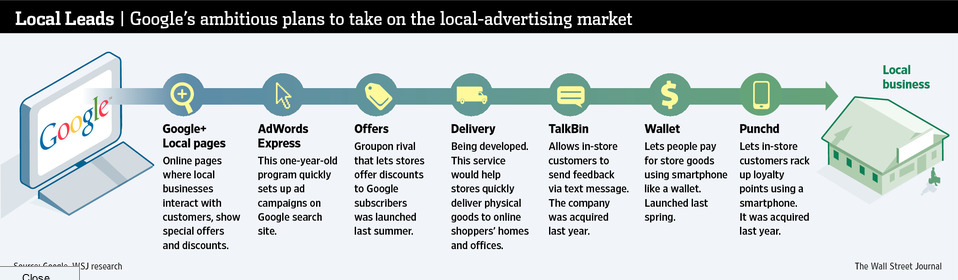
Over the past year Google bought Zagat but they also bought local online services Punchd (a digital loyalty program) and Talkbin (an SMS based) CRM program. Both programs that have a strong potential appeal in the local market. In the recent rollout we see a glimmering of using the business listing as a local transaction engine with the inclusion of OpenTable.

When you add all of that up you come to the inescapable conclusion that the backend Dashboard is undergoing a massive rework and will likely become a central point for the SMB to interact with all of Google’s products with a special emphasis on Google Plus.

David Mihm has written about a vision of what the Dashboard could and should become. Bing has implemented a blueprint for an integrated marketing portal that might also provide a guide to Google. Whatever it is it will need to be more engaging, more valuable and more integral to local businesses ongoing marketing needs: better analytics, simple integration with G+, CRM, easy opt-in to Google’s paid products, the ability for the business to easily understand and interact with a full range of Google’s local offerings and the ability for Google to plug in more functionality down the road.

Today the Wall Street Journal today essentially confirmed this direction. They note that by early July Google will be rolling out such a product:

The project combines several products and services aimed at small businesses under a single banner. It is based on a mix of internally developed software and recently acquired technologies that the company hopes eventually will bring in billions of dollars a year in new revenue.

Central to the effort is Google+, the company’s social network, which it hopes consumers will use to interact with local businesses that now have special Web pages on the network. Those Google+ pages will draw traffic from the company’s Web-search engine. When shoppers visit these businesses, Google wants them to use their Internet-connected phones like a digital wallet, earning loyalty points and making payments at stores that sign up for Google’s new services.

When this occurs the real Google+ Local will be rolling out, not just a new location for a landing page, but a substantial improvement to the static and marginally functional Dashboard. Let’s hope that it is an integrated marketing solution that is elegant, provides significant on-going value and works properly right out of the gate (oh and is multiuser).
 

University of Washington: Campus Map

Map of the Week: University of Washington Campus Map
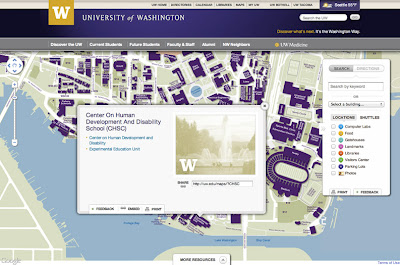
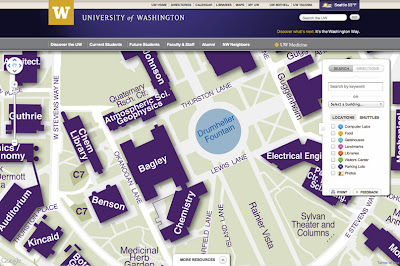
Why we like it: A beautiful use of interactive custom tiles, custom info windows, and the Google Directions API for embedded walk/bike/drive directions. A great example of a highly customized Google Map.

The beginning of May marks the start of college graduation in many places around the world. When the day comes for long awaited college graduation ceremonies, finding the events on campus can be daunting for visiting family and friends. Just in time for spring graduation ceremonies, comes this great Google Map from the University of Washington. For a large school like the University of Washington that occupies over 500 buildings and over 20 million gross square feet of space, a good map is a must to help visitors and students alike find their way around.

What sets this map apart is the high level of customization, most notably the well designed, custom interactive tiles that highlight university buildings and points of interest. University buildings stand-out from the map in deep purple and display a custom InfoWindow with additional information when you click on them. For sharing convenience, each building has its shortened url.

Overall the map looks great responds quickly as you search around campus. Embedded into the map are walking/biking/driving directions that allows users to route in between buildings and point of interest.

Just in case you won’t be visiting the University of Washington in the near future, here are some other campus maps worth checking out: Northeastern University, UCSD Bus Map, and Universidad de Murcia. Also, the Google Developers Showcase has this and many more campus maps worth checking out.


Bing Maps: BlackBerry PlayBook – How To Demo (Official Demo Video)

(Official BlackBerry® PlayBook™ Demo) Learn how Bing Maps on your BlackBerry PlayBook can find your location, give you directions and more! To view more BlackBerry PlayBook demo videos, visit: demos.blackberry.com/playbook

http://www.youtube.com/v/G17Zq2UdqwY?version=3&f=videos&app=youtube_gdata

Biking and walking directions on Custom Maps

You can now use your desktop to create a biking or walking itinerary using Custom Maps in Google Maps. You can choose to share these directions by allowing people to view your Custom Map and avoid the hassle of scribbling them down or printing them out. Additionally, you can access these stored directions from your phone with the Google Maps Android application.

This provides a quick and easy way to navigate trips that have multiple routes and stops when you’re on-the-go. Give it a try the next time you plan a group bike ride or to keep track of your favorite jogging routes.

To start, first get directions to your destination(s) and select the biking or walking icon in Google Maps. Next, scroll down to the bottom of the directions in the left-hand panel and click the “Save to My Maps” link.


You can then save the directions to an existing custom map or create a new one. Once the directions have been added to a custom map, you can continue to insert extra stops or make notes. After you complete mapping out your itinerary, you can choose to share it with friends or a workout buddy.

If you have an Android-powered device, you can access stored directions in Custom Maps right from your mobile phone – just click on the layers icon in the upper toolbar and select the saved Custom Map you want.

If you don’t have an Android phone, you can open your Custom Maps using your phone’s browser and visiting maps.google.com.


Google Maps Design Evolution

The start of a comprehensive visual redesign for Google Maps founded on three key principles: focus, elasticity, and effortlessness. This week Google continuing to implement that philosophy by improving and evolving a few key features.

Perhaps the most notable change is an update to the styling and color of  iconic pins across all Google properties. This change reflects our interface’s recent design evolution, introducing a more harmonious visual relationship between the on-map markers and the map itself.


On-map controls are also now more visually aligned with the rest of our design system. Together these changes reflect our recent efforts to reduce unnecessary clutter and give greater priority to information on the map.


In the header we’re also introducing more prominent buttons for Directions and My places integrated into an elastic interface that expands and contracts to best fit your browser window size.

Putting all of these changes together you get:

We hope you find this a welcome update making Google Maps more functional, effortless, and enjoyable. This is just one part of the many design updates that will continue rolling out across Google Maps in the coming weeks and months, so keep an eye out for more!