A tribute to Bob Moog

In the mid-1960s, Dr. Robert Moog unleashed a new universe of sounds into musicdom with his invention of the electronic analog Moog Synthesizer. The timbre and tones of these keyboard instruments (true works of art in and of themselves) would come to define a generation of music, featuring heavily in songs by The Beatles, The Doors, Stevie Wonder, Kraftwerk and many others.

When people hear the word “synthesizer” they often think “synthetic”—fake, manufactured, unnatural. In contrast, Bob Moog’s synthesizers produce beautiful, organic and rich sounds that are, nearly 50 years later, regarded by many professional musicians as the epitome of an electronic instrument. “Synthesizer,” it turns out, refers to the synthesis embedded in Moog’s instruments: a network of electronic components working together to create a whole greater than the sum of the parts.

With his passion for high-tech toolmaking in the service of creativity, Bob Moog is something of a patron saint of the nerdy arts and a hero to many of us here. So for the next 24 hours on our homepage, you’ll find an interactive, playable logo inspired by the instruments with which Moog brought musical performance into the electronic age. You can use your mouse or computer keyboard to control the mini-synthesizer’s keys and knobs to make nearly limitless sounds. Keeping with the theme of 1960s music technology, we’ve patched the keyboard into a 4-track tape recorder so you can record, play back and share songs via short links or Google+.

Much like the musical machines Bob Moog created, this doodle was synthesized from a number of smaller components to form a unique instrument. When experienced with Google Chrome, sound is generated natively using the Web Audio API—a doodle first (for other browsers the Flash plugin is used). This doodle also takes advantage of JavaScript, Closure libraries, CSS3 and tools like Google Web Fonts, the Google+ API, the Google URL Shortener and App Engine.

Special thanks to engineers Reinaldo Aguiar and Rui Lopes and doodle team lead Ryan Germick for their work, as well as the Bob Moog Foundation and Moog Music for their blessing. Now give those knobs a spin and compose a tune that would make Dr. Moog smile!

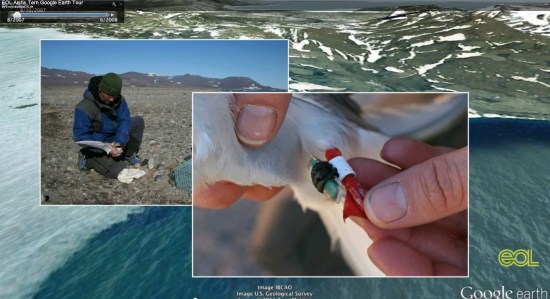
The Arctic Tern and the Sea Grapes


Last fall we showed you a great file from the people at Encyclopedia of Life that tracked Bluefin Tuna across the Atlantic. They’re back with a few new files that show how a type of sea algae (known as “sea grapes”) and Arctic Terns travel across the world as part of their annual migrations.


tern.jpg 

Ari Daniel Shapiro has worked with others, including Marie Studer and Eduardo Garcia Milagros, to put together some remarkable new tours. Ari’s background is in radio, so the audio narrative on the tours is excellent. Combine that with the images, video and Google Earth content and you’ve got a very engrossing and educational result.

The tours are available below, both in KMZ format for you to enjoy:

Sea Grapes Tour | KMZ


Arctic Tern Tour | KMZ


For more, you can view all of their tours on the Encyclopedia of Life site.

Google Earth Tours in Geog. Teaching III

This is a 3rd of a 3 part series. Part 1 was introduction and started the ‘rules of flight’. Part 2 finished off the rules of flight. This post covers audio, annotations, testing, use of layers and a literature review that covers all three posts.

3. Audio:
Research shows that an audio commentary is much easier to understand than a narrative delivered via on screen text. Labels identifying major sections of the animation also add value. However, adding background music has been shown to be valueless – it’s just a distraction in an educational situation.

Audio and visual elements should match in a GET because you shouldn’t make users interpret two different presentations at the same time. A critique of a GET which did not follow this advice can be found in an earlier blog post of mine under the heading; “Talk about what’s on Screen”

Audio Practicalities: I describe how to produce an audio GET in this tutorial

4. Annotations:
If the GET audio track has a descriptive line like ‘and here you can see the extent of the Scottish Highlands’ use an on screen marker such as a polygon to draw the viewers eye to the location concerned. Annotations like this should be used throughout tours, its easy to learn about a study area by doing a tour and forget that your users haven’t formed a cognitive map. Annotating what you’re discussing is a solution to this.

5. Testing:
Despite the best intentions, and having created a GET that you think looks and sounds excellent, often users miss elements that you thought you had made obvious or they misinterpret the message of the tour in ways that the author had not considered. The only solution is to test 2 or 3 typical users before releasing your GET, fortunately, this is much quicker, simpler and cheaper than you would imagine following Hallway testing guidelines.

6. Use of Layers:
A layer refers to a set of data, examples include: a thematic map showing voting by region in an election or a set of placemarks showing locations of pizza restaurants. If you wish to explain a complex map which is made up of a combination of layers e.g. showing that right wing voter States in the USA have more pizza restaurants in them, you will need to use multiple layers. It helps your users if you turn the layers on one by one in your tour explaining what the screen is showing as you go. Showing them all the layers at once and trying to explain what they are seeing is less clear.

Sometimes layers are complex enough to require annotations themselves (e.g. circling an area of particularly dense concentration of pizza restaurants)

Layers Practicalities: In running through a tour to record an audio it can often help to collect separate layers into a folder. When running through the tour you can then select a camera view for the folder and turn all the elements in it on and off at the same time. For example, you could put the pizza restaurants layer and a polygon annotation mentioned above in one folder.

Literature Review: In writing this series I did a literature review which the academics amongst you may find useful. I’ve expanded it since writing this.