The new 3D cities on Google Earth for Android

Explorers of the world, rejoice! There is now a new way to explore the world, right from the palm of your hand. Gone are the days when the only way to get a bird’s eye, 3D view of your favorite metropolitan area was from the window of a penthouse apartment or helicopter. Now you can soar above your favorite cities in 3D, with Google Earth for mobile.


New 3D Imagery

We recently shared a preview of this striking new 3D imagery and starting today, you can take flight yourself with our latest version of Google Earth for Android. An updated version of Google Earth for iOS will be also be available soon.
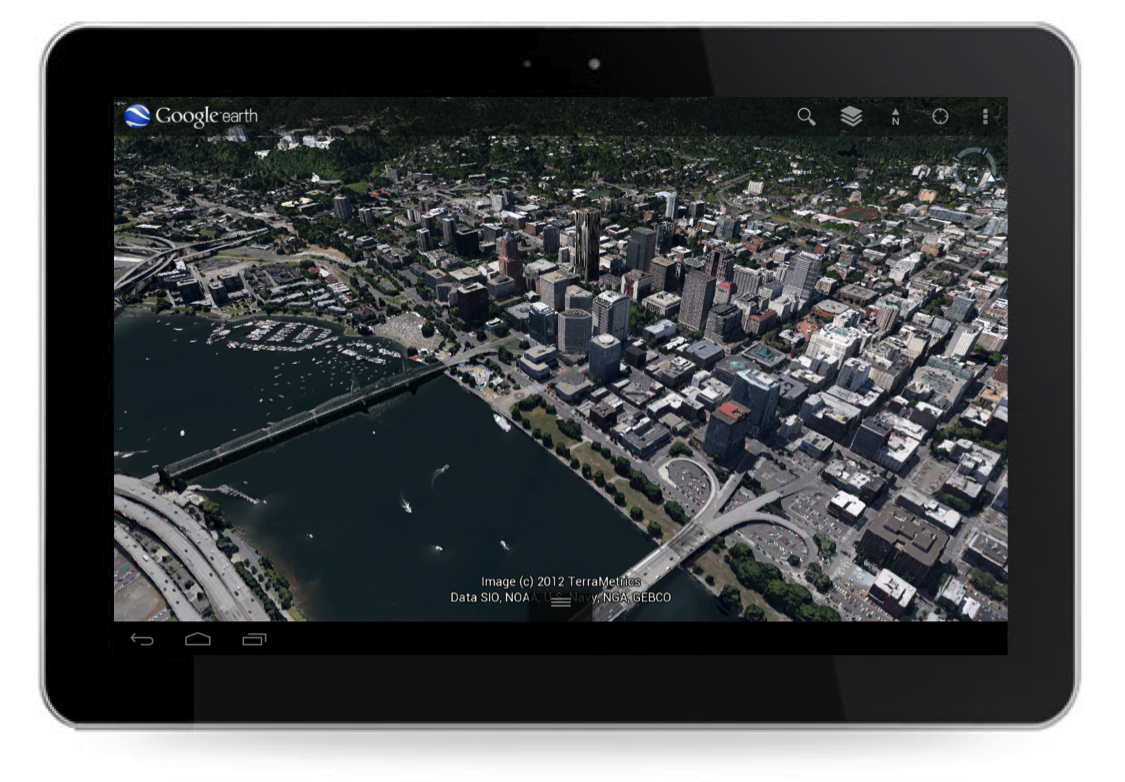


New 3D imagery of Portland, Oregon

Creating this comprehensive 3D experience is possible due to advanced image processing. Using 45-degree aerial imagery, we’re able to automatically recreate entire metropolitan areas in 3D. This means every building (not just the famous landmarks), the terrain, and any surrounding landscape of trees are included to provide a much more accurate and realistic experience.


Get started today by taking a virtual flight over one of our initial 3D imagery cities: Boulder, Boston, Santa Cruz, San Diego, Los Angeles, Long Beach, San Antonio, Charlotte, Tucson, Lawrence, Portland, Tampa, Rome or the San Francisco Bay Area (including the Peninsula and East Bay). We’ll continue to release new 3D imagery for places around the world over the coming months; by the end of the year, we aim to have new 3D coverage for metropolitan areas with a combined population of 300 million people.

Tour Guide

Not sure where to begin? Let the new tour guide help show you the way. We’ve put together short tours of thousands of famous places and historical sites across the globe so it’s easier than ever to discover amazing places. Just pull up the tab at the bottom of the screen to open the tour guide. Each image highlights a tours or place of interest in the area you are looking. Click on an item and you will be flown there. As you fly in and around the sites, snippets from Wikipedia provide additional information about the location. It’s like having a local expert right beside you!
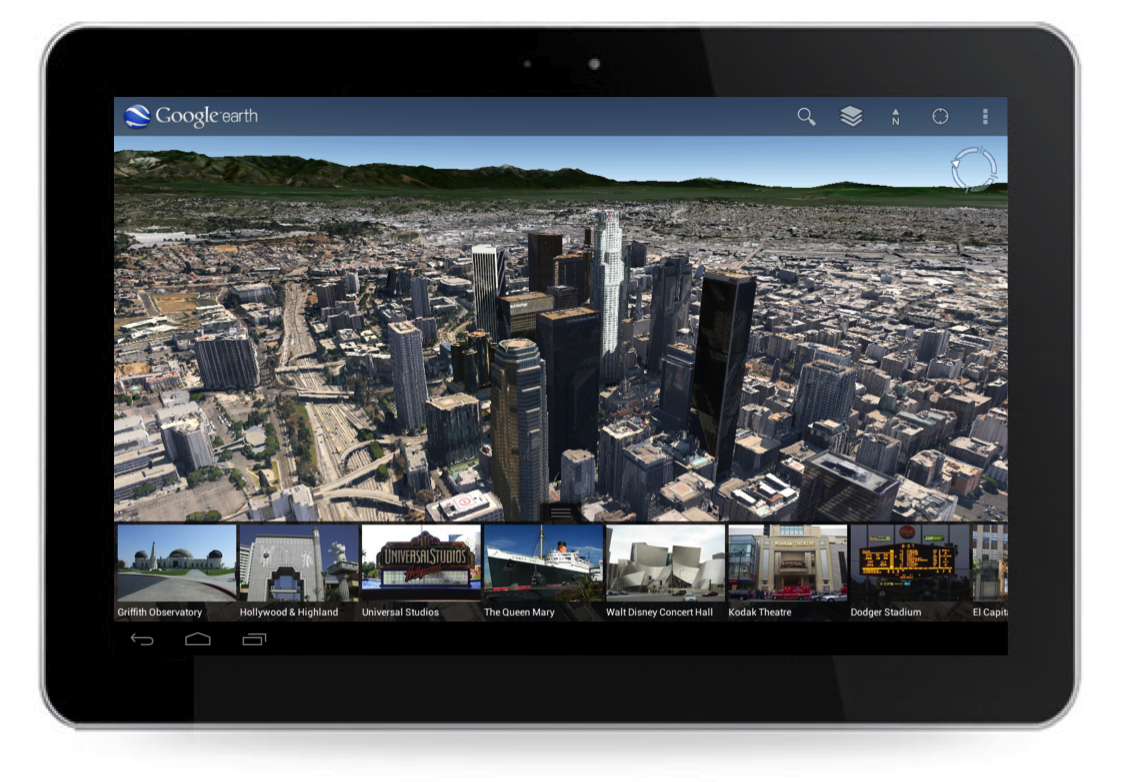


Tour guide showing top destinations around Los Angeles.

We hope this more accurate, comprehensive and realistic 3D representation of the Earth brings out the inner explorer in you. Whether you are visiting familiar grounds or venturing out into the world, Google Earth is there to show you the way.

The quest for the perfect map

(Cross posted from the Official Google Blog)

For the last decade we’ve obsessed over building great maps for our users—maps that are totally comprehensive (we’re shooting for literally the whole world), ever more accurate and incredibly easy to navigate.

Comprehensiveness

It’s a pretty limited search engine that only draws from a subset of sources. In the same way, it’s not much of a map that leaves you stranded the moment you step off the highway or visit a new country. Over the last few years we’ve been building a comprehensive base map of the entire globe—based on public and commercial data, imagery from every level (satellite, aerial and street level) and the collective knowledge of our millions of users.

Today, we’re taking another step forward with our Street View Trekker. You’ve seen our cars, trikes, snowmobiles and trolleys—but wheels only get you so far. There’s a whole wilderness out there that is only accessible by foot. Trekker solves that problem by enabling us to photograph beautiful places such as the Grand Canyon so anyone can explore them. All the equipment fits in this one backpack, and we’ve already taken it out on the slopes.

Luc Vincent, engineering director, taking the Street View Trekker for a trial run in Tahoe

Accuracy

The next attribute map makers obsess over is accuracy. We still have a way to go because the world is constantly changing—with new houses, cities and parks appearing all the time—it’s a never ending job. But by cross-checking the data we have, we can significantly improve the accuracy of our maps. Turns out our users are as passionate about the quality of Google Maps as we are, and they give us great feedback on where we can do better. We make thousands of edits a day based on user feedback through our Report a Problem tool and via Map Maker, which we launched in 2008. Today we’re announcing the expansion of Map Maker to South Africa and Egypt, and to 10 more countries in the next few weeks: Australia, Austria, Belgium, Denmark, Finland, Liechtenstein, Luxembourg, New Zealand, Norway and Switzerland.

Usability

The final element of the perfect map is usability. It’s hard to remember what digital maps were like before Google Maps went live in 2005, and the huge technological breakthroughs that transformed clicking on arrows and waiting, to simply dragging a map with a mouse and watching it render smoothly and quickly. Plus, we added one single search box. Today we have thousands of data sources that feed into our maps making them a rich and interactive experience on any device—from driving directions to transit and indoor maps to restaurant reviews.

People have been asking for the ability to use our maps offline on their mobile phones. So today we’re announcing that offline Google Maps for Android are coming in the next few weeks. Users will be able to take maps offline from more than 100 countries. This means that the next time you are on the subway, or don’t have a data connection, you can still use our maps.

The next dimension

An important next step in improving all of these areas—comprehensiveness, accuracy, and usability of our maps—is the ability to model the world in 3D. Since 2006, we’ve had textured 3D buildings in Google Earth, and today we are excited to announce that we will begin adding 3D models to entire metropolitan areas to Google Earth on mobile devices. This is possible thanks to a combination of our new imagery rendering techniques and computer vision that let us automatically create 3D cityscapes, complete with buildings, terrain and even landscaping, from 45-degree aerial imagery. By the end of the year we aim to have 3D coverage for metropolitan areas with a combined population of 300 million people.

I have been working on mapping technology most of my life. We’ve made more progress, more quickly as an industry than I ever imagined possible. And we expect innovation to speed-up even more over the next few years. While we may never create the perfect map … we’re going to get much, much closer than we are today.

Finding the right maps for your Garmin Nuvi

Learn more about Garmin Garage, how to get our voices on your Nuvi with the Voice Studio and how to load European maps to your device. To see your question featured on Ask Garmin, send response to garminblogs@garmin.com.

http://www.youtube.com/v/wgOineH_Cao?version=3&f=videos&app=youtube_gdata

Now playing: Faster movie search on Android and iPhone

With the December movie season in full swing, we’ve just made it even faster and easier to discover movies, showtimes and theaters, all from your smartphone. Now when you search for [movies] or your favorite theater like [century san francisco] on Google.com from your phone, you’ll see interactive results for movies in a new swipeable ribbon, with the most relevant information displayed at the top of the page.

For each movie, you’ll see the movie poster, a short summary, ratings and the nearest theaters and showtimes. Designed to help you quickly browse what’s playing in theaters now, this information instantly updates as you slide through the movie posters — no need to wait for a page to load or to use the back button.

To learn more about a movie, tap the movie title to find details like the cast and a full summary. And if you see a play button on the movie poster, you can tap to view the official trailer. You can even buy tickets directly from your smartphone by tapping on underlined showtimes — and skip past those long holiday box office lines!

So the next time you head out to see sagas of vampires, the world’s biggest Muppets fan, dancing penguins or nearly impossible heists, try the new interactive results for movies by visiting Google.com on your iOS or Android phone’s browser and searching for [movies], [theaters] or a movie title. This feature is available in English, in the US.

(Cross-posted on the Inside Search blog)

Custom content for Google Earth on Android

One of the most powerful features of Google Earth is the ability to view custom maps or overlays, which are also commonly known as KML files. Ever since we introduced Google Earth on mobile devices, users have requested support for custom content. Today, we are proud to announce Google Earth 6.2 for Android and iOS, which includes support for KMLs. Now anywhere you find a “Google Earth file” (KML file) while you’re browsing the mobile web, just click on the link and the Google Earth app will automatically launch and load the custom map.

With this release, the Google Earth Gallery is also now available in the mobile app, enabling you to easily explore some of the best maps from around the web directly within Google Earth. For example, not sure if that was an earthquake? Go to the Earth Gallery and click on the USGS’ real-time earthquake map to see recent earthquakes from around the world.

Maybe you’re interested in finding hiking trails on your next vacation. Check out Everytrail to find a hike wherever you might be.

If you’re a basketball fan, be sure to check out the new College Basketball Tournament map, which takes you on a virtual trip to the school and stadiums of this year’s competing teams.

For Google Earth for Android users, we’ve also added a new “Share” feature, which allows you to share a screenshot of your current view with people in your Google+ circles, via Gmail, or on other applications. Now you can share your favorite places with friends and family from your desktop computer, mobile phone or tablet. And, if you follow the Google Earth +Page, you can see what others are sharing and discover new locations around the world.

The 6.2 release of Google Earth for Android and iOS also includes improvements in navigation, which make it even easier to fly to your favorite spots on the globe.

To check out the latest version of Google Earth for Android phones and tablets, download it now from Google Play.