A New Way to Follow the Google Maps API Google+ page

To the Google Maps Developer Relations team, the most exciting feature of Google+ is the opportunities it gives us to connect with Google Maps API developers from around the world. That’s why today we’re very excited to announce the launch of the Google Maps API Google+ page.
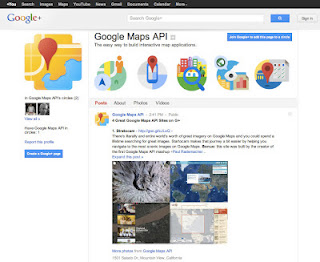
The Google Maps API Page will be used to give helpful tips about using our APIs, announce our office-hours hangouts, and point you to new cool maps that we find. We’ll also use the page to tell you about upcoming events, highlight announcements, link to helpful articles, and a lot more. It’ll also give us a stronger means to connect with our valued developer community. For instance, today we announced the next Google Maps API Office Hours, in which you can connect to the Maps Developer Relations team through Google Plus Hangouts.

Over the past couple of months, the Maps DevRel team has been connecting with Google Maps API developers through our personal accounts. We’ve now created a new circle that you can follow that has all of us in it.

For years, this blog has been the primary way for developers to keep up to date about the goings-on in the Google Maps API world and that isn’t going to change. We see the new Google+ page as adding a new way for you to connect with the Google Maps API team.

The Bing Maps Webcasts Now Open for Registration

The Bing Maps Platform from Microsoft enables organizations to easily and cost-effectively deliver geospatial content to the customers and businesses they serve. Not only does this optimize existing investments in GIS and imagery services, it allows organizations to save money using Bing Maps by making strong connections with customers and exposing relevant content easily on a map from Bing.

Register today to attend a webcast and learn more. Topics include:


What’s New in the Bing Maps Platform?  | February 16, 2012, 2pm Eastern time, 60-minutes

Attend this session for an overview of the latest capabilities in the Bing Maps Platform. You’ll learn the latest on the Bing Maps Imagery program, how to view the meta data and other features in the platform including the best portal to see the latest new imagery sets.


Using the BingMapsPortal.com and keys with Bing Maps Platform | March 15, 2012, 2pm Eastern time, 60-minutes

Attend this session and learn how to use the bingmapsportal.com, tips for using/hiding your Bing Maps key and other helpful development hints.


Bing Maps Spatial Data Services | April 19, 2012, 2pm Eastern time, 60-minutes

Attend this session and learn how to take advantage of the Bing Maps Spatial Data Services included with the Bing Maps Platform for data hosting and findnearby/bound box queries.


The HealthGrades website and Bing Maps


Named one of the Top 50 Websites of 2011 by TIME, HealthGrades was already the leading online tool to help people rate and find doctors. But HealthGrades was determined to give customers an even better experience. Once users found “Dr. Right,” HealthGrades wanted to give folks an easy way to locate offices and quickly get directions. With Bing Maps, HealthGrades found they could seamlessly integrate maps into their physician search tool. Using the handy Bing Maps developer tools, HealthGrades built the maps integration themselves, with some architecture and design support from development partner, OnTerra. Way to go, HealthGrades!

HealthGrades

Whatever business you’re in, chances are there’s a Bing Maps solution waiting just for you. Build it yourself with our free web or phone SDKs. Or get a little help from one of our Bing Maps partners.

The Bing Maps WPF Control

Since rejoining the Bing Maps team, I’ve been heads down focusing on the developer experience for Bing Maps. As a result, we’re releasing the Bing Maps WPF Control Beta on the Microsoft Download Center. What is WPF? The Windows Presentation Foundation (WPF) provides developers with a unified programming model for building rich Windows smart client user experiences that incorporate UI, media, and documents.

The WPF Control has everything you’d expect from a Bing Maps control including the ability to present information via a WPF native control such as:

· Map Styles: Road, Aerial and Hybrid

· The ability to place shapes on the map via lat/lon – pins, polylines and polygons

· Navigating the map with pan and zoom keyboard controls


We’ve also opened up a lot of the abilities within the control to empower the developer to take control of the user experience. So, you’ll notice there is no default navigation, no default pushpins and none roll overs – this is truly a blank (er, map-based) canvas – we want to see you do some killer things with.

Perhaps the most notable facet to this WPF control is support for Microsoft Surface. That’s right. The Bing Maps WPF Control Beta is touch-enabled with support for Surface v 2’s Pixel Sense technology. So, for those of you using WPF in your Surface applications you’ll have native support for touch features.

We worked closely with the Surface team and have had a constant need to support our WPF developer community with mapping. In the past, we’ve pushed to have WPF developers use the Bing Maps Silverlight Control (or our Bing Maps AJAX Control v7) in a web control, but it’s just not the same as having managed code libraries to work with.

The WPF control supports full rotation and inertia with options to turn both off. Plus, infinite scroll maps, touch to lat/lon to pixel conversions (think touch to add a pushpin) and the ability to plug into the Bing Maps REST API for geocoding and routing or the Bing API for search.

We hope you enjoy the control. It’s a beta, so we’re looking for some feedback on what you think, what works and what doesn’t. All questions/comments/feedback can be directed to the MSDN Forums. We hope to see some awesome applications built in WPF and Surface applications with our Bing Maps control.

Google: GDC Online Oct 10th-12th

This year at the Game Developers Conference (GDC) Online we have organized a Developer Day on Oct. 10th full of Google information for game developers. It will feature hardcore technical information on Google products and platforms delivered by Google engineers and developer advocates. We’ll discuss the latest projects we’re working on and how our online technologies can help you better create, distribute, and monetize games that reach a larger audience than ever before. We’ll present everything from how developers can build hardware accelerated 3D games for the browser with WebGL to the game framework used to bring Angry Birds to the Web.

In addition to the Developer Day, we will also have a booth on the Expo floor on Oct. 11th-12th where we’ll have representatives from the Chrome Web Store, Native Client, WebGL, App Engine, Google+, In-App Payments, Google TV, and AdSense/AdMob demoing technologies and platforms for game developers. Come by booth 503 to try out Google products and ask questions, or hang out in our Google TV lounge.

For more information on our presence at GDC Online, including session and speaker details, please visit http://www.google.com/events/gdc/2011. Hope to see you in Austin!

Not able to attend GDC? Check out Google Game Developer Central to get an overview of Google products and services that are particularly relevant to game developers.