 |
$39.90 (0 Bids)
End Date: Thursday May-24-2012 19:50:32 PDT
|
The University of Wisconsin-Fox Valley
Dr. Andrew Shears is an Assistant Professor of Geography at the University of Wisconsin – Fox Valley, and this past semester he led a great project in his GEO 106 class – modeling the entire campus!
He first divided the campus into five sections for his 20 students to tackle, then set them to work. The end result is an excellent model of the campus that all of us will get to enjoy:
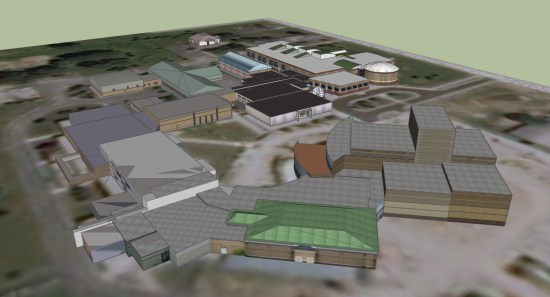
The models have been submitted to Google for approval, though they aren’t yet showing up in the base layer of 3D Buildings in Google Earth. I’d expect to see them arrive in the next week or two.
Dr. Shears has written a very detailed blog entry that walks you through every aspect of the modeling process. It looks like it was a great class, the students learned a lot, and the resulting model is something that they can all be proud of!
MapMyFITNESS and Google Maps API for Business
Being fit means moving and moving means going someplace. We created the MapMyFITNESS applications because we are passionate about living active lifestyles and we wanted a way to both track our progress and explore new activities. We wanted to help people experience this passion for themselves. As our community of MapMyFITNESS users has grown to over 9 million people, we have continually worked to make the applications easier to use and more effective at motivating people to keep moving, whether they’re elite athletes or people just getting started.
A key component to that mission has been our integration with Google Maps, which has made it easy for our users to find new routes or make their own, then share them with the rest of the MapMyFITNESS community. As one of the earliest Google Maps API developers, we noticed it was easy to incorporate the mapping functionality into our product. As we set about to completely rebuild our platform that launched earlier this month, our goal was to expand the ways users could take advantage of Google Maps’ latest API functionality. We’ve gone from tracking and sharing routes in our old platform to providing “Courses” in our new platform. Courses provide our users with real-time data like traffic patterns and temperature, and include “check-in” technology that helps them track workouts, share their progress, and compete in our new leaderboard against specific groups of people. They can compete with local clubs, friends, and most importantly against themselves and their own progress.
The Google Maps API allowed us to show the important information to our users in an easy to read format. Users can visit our site to find new cycling, running or walking routes by searching for the route while viewing it on the map. By using the Google Maps API were we able to incorporate the Street View API to create virtual tours of routes and the Elevation API to calculate how many feet you climb – and descend – during your workout. That familiarity, in addition to fantastic technology and features, makes the user experience both easier and more powerful.