Android app for Google Offers


Google announcing their new Google Offers mobile app, that allows you to discover, buy and redeem your favorite deals on the go. The free app will notify you about all the great Offers that match your interests. You can purchase offers in just a few clicks and even redeem paperlessly with select merchants.


Check out today’s deal from REI on the Google Offers app: $15 for $25 to spend on gear at the national outdoor retailer.


Visit Android Market to download the app and check out www.google.com/offers to learn more about Google Offers.

The Google Offers mobile app is only available in the US.

Nothing but the web

We believe in the vision of “nothing but the web” — where business applications are delivered over the Internet and accessed in a web browser. Why? We believe the web brings substantial benefits for companies that no other IT model can — in simplicity, cost, security, flexibility and pace of innovation.

Of course, we recognize that some companies have substantial investments in legacy technology — desktop applications or client/server applications which they’re using every day. We’d like to understand what it will take to move these apps to the web.

Are you a business app developer?

Do you build or maintain business applications– either internally for your company or for sale to other companies? We’d love to hear more about your apps, tools and what types of challenges you have. Please fill out this short survey and let us know whether you’d be interested in a potential HTML5 training class.

Are you a business user or IT administrator?

We’d love to hear what apps you’re still using in your business which haven’t yet moved to the web and why. Please fill out this short survey.

The New Blogger

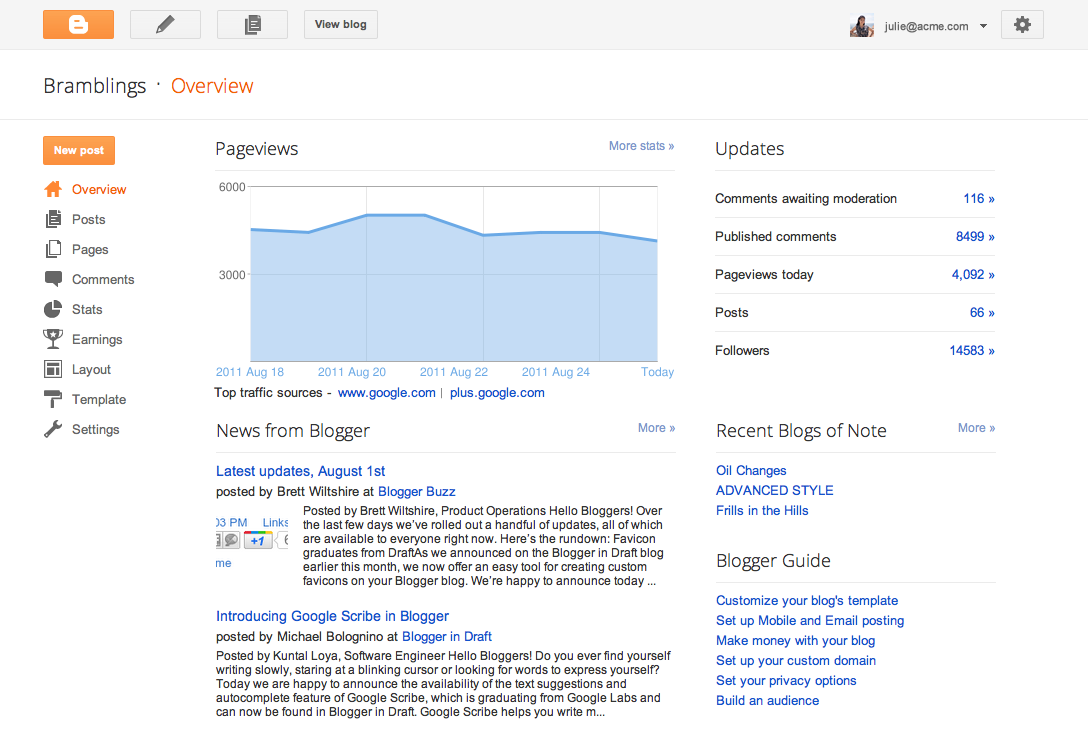
Blogger rolled out some nice new stuff this week. It’s different inside and out. As a heavy user of Blogger (you’re soaking in it!), I’m happy with anything that helps us make a better blog for you to read. If you have a Blogger blog of your own, here are a couple of the changes you’ll notice:

  • Each settings page has a button that starts a new post. Creating posts is what bloggers do most, and now you always can get to the post editor with one click.
  • You can see traffic and other stats in one place. The new Overview page shows you page views, comment activity, follower counts, and more.

For more information on what’s new in Blogger, and to find out how to turn on the new features, see this Blogger Buzz post.

Adding features to software is hard enough. Bumping celestial bodies around is another matter entirely. Hexi Baoyin of Tsinghua University has suggested giving a gentle shove to an asteroid so that it ends up in Earth orbit.

Google Map Maker in Pakistan

The month of June proved fruitful for mapping enthusiasts, tech buffs, and entrepreneurs throughout Pakistan as they gathered for a series of Google MapUps organized at universities in three major cities: Islamabad, Lahore and Karachi.

Led by Google Pakistan Country Consultant, Badar Khushnood and a trio of Pakistan’s Map Maker Advocates—Faraz Ahmad, Jabran Rafique and Omer Sheikh—the three events welcomed a total of 150 participants to learn the ins and outs of Google Map Maker. The intent of the MapUps was to guide new users through the process of mapping their cities and neighborhoods while stressing the importance of having a complete map of Pakistan available online.
Recent mapping efforts in Pakistan have been predominantly aligned with relief efforts following Pakistan’s 2010 floods and landslides, as demonstrated by Omer, Jabran and Faraz. Dr. Sayeed Ghani spoke at the Karachi MapUp about Sindh Flood Maps, his community-based geographic information system (GIS) that implements a Google Maps API to assist in disaster management. Dr. Sohaib Khan, who co-hosted the Lahore MapUp, has also focused on flood relief.

On a basic level, the aim of MapUps is to teach new and aspiring mappers the fundamentals of Map Maker, and to bring them together to map their community. Omer explained that “The idea is to get the participants started in the hope that they will continue mapping in the future.” Badar Khushnood and our Mapping Advocates ultimately highlighted the tools and motivation behind mapping, highlighting it as influential, inspirational, and humanitarian.

Google MapUp, NU-FAST, Islamabad, Pakistan
Learn more about hosting a Google MapUp in your own community, and be sure to visit our Advocates and other passionate and helpful mappers in our Map Your World Community.

How to Convert Tile Coordinates

In addition to referencing tiles by quadkey, Bing Maps also refers to tiles by x, y, and z coordinates. This is the way you reference tiles when overriding the GetUri() method of the Silverlight Microsoft.Maps.MapControl.TileSource class, for example, and the x, y, z properties of a tile are passed to the uriConstructor function specified in the options for an AJAX v7 Microsoft.Maps.TileSource.

In the x, y, z tile identification system:

  • z is the zoom level of the grid
  • x and y are the column and row number at which this tile should be placed, measured from an origin at the top left of the map.

Thus, at zoom level 1, you can describe the four tiles required to make a complete Bing Map using x, y, z coordinates as follows:

image

Bing Maps is not entirely unusual in this respect – this exact same referencing system is used by Google Maps, Open Street Maps, ESRI, and many others. You’d therefore be forgiven for thinking that it was some sort of standard.

In fact, this tile numbering sounds a lot like (and is often incorrectly described as) a  TMS index. The Tile Map Service (TMS) Specification defined by the Open Source Geospatial Foundation is a standard for serving map tiles that, like the system described above, places tiles on a grid and refers to their position using x, y, and z coordinates, where z is the zoom level, and x and y refer to column and row positions. However, according to the TMS specifications, “The x-coordinate of the tile numbers increases with the x-coordinate of the spatial reference system, and the y-coordinate of the tile numbers also increases with the y-coordinate of the spatial reference system.”. In other words, tile (0, 0), at any zoom level should always be placed at the bottom left of the map, not the top left.

Using the TMS system, the tile indexes at zoom level 1 become as follows:

image

The problem is that, since these systems are identical in almost every other respect, people tend to assume that the system used by Google/Bing/OSM et al. is the standard and systems that output tiles using it sometimes mistakenly refer to it as the TMS format. Then,  every now and again, you come across a piece of software or service that genuinely outputs tiles numbered according to the TMS standard and, if you don’t correct the tile origin, your tiles all end upside-down on the wrong side of the world :(

Fortunately, it’s a very simple correction to make. At any given map zoom level, zoom, you can invert the y index of a tile from TMS to Google/Bing as follows:

var ymax = 1 << zoom;
var y = ymax - y - 1;

Assuming that you have a set of TMS tiles stored in a subdirectory structure that follows the pattern /z/y/x.png (as described in the Tile Resources section of the OSGeo TMS standard), then here’s a full example showing how to add a tilelayer of TMS tiles to Bing Maps v7:

<!DOCTYPE HTML PUBLIC "-//W3C//DTD XHTML 1.0 Transitional//EN" "http://www.w3.org/TR/xhtml1/DTD/xhtml1-transitional.dtd">
<html  xmlns="http://www.w3.org/1999/xhtml">
<head>
<title></title>
<meta http-equiv="Content-Type" content="text/html; charset=utf-8" />
<script type="text/javascript" src="http://ecn.dev.virtualearth.net/mapcontrol/mapcontrol.ashx?v=7.0"></script>
<script type="text/javascript">
  var map = null;
  function GetMap() {
    // Create a basic map
    map = new Microsoft.Maps.Map(document.getElementById("mapDiv"),
      { credentials: "ENTERYOURBINGMAPSKEY",
        center: new Microsoft.Maps.Location(52.6, 1.26),
        zoom: 12
      });

    // Create the tile source
    var tileSource = new Microsoft.Maps.TileSource({ uriConstructor: getTMSTilePath });

    // Construct the layer using the tile source
    var tilelayer = new Microsoft.Maps.TileLayer({ mercator: tileSource, opacity: 1 });

    // Push the tile layer to the map
    map.entities.push(tilelayer);
  }

  function getTMSTilePath(tile) {

    var x = tile.x;
    var z = tile.levelOfDetail;
    // Invert tile y origin from top to bottom of map
    var ymax = 1 << z;
    var y = ymax - tile.y - 1;

    return location.href.substring(0, location.href.lastIndexOf('/')) + "/" + z + "/" + x + "/" + y + ".png";
  }
</script>
</head>
<body onload="GetMap();">
  <div id='mapDiv' style="position:relative; width:1024px; height:768px;"></div>
</body>
</html>

As a final note, just to add to the confusion, the Web Map Tile Service (WMTS) recently published by the OGC provides an alternative standard to TMS, but, like Google/Bing, uses an origin at the top-left hand corner.