The smartphone growth is global

Last October, we launched Our Mobile Planet, a resource enabling anyone to visualize the ways smartphones are transforming how people connect with information, each other and the places around them.

Today, we’re releasing new 2012 research data, and the findings are clear—smartphone adoption has gone global. Today, Australia, U.K., Sweden, Norway, Saudi Arabia and UAE each have more than 50 percent of their population on smartphones. An additional seven countries—U.S., New Zealand, Denmark, Ireland, Netherlands, Spain and Switzerland—now have greater than 40 percent smartphone penetration. In the U.S., 80 percent of smartphone owners say they don’t leave home without their device—and one in three would even give up their TV before their mobile devices!
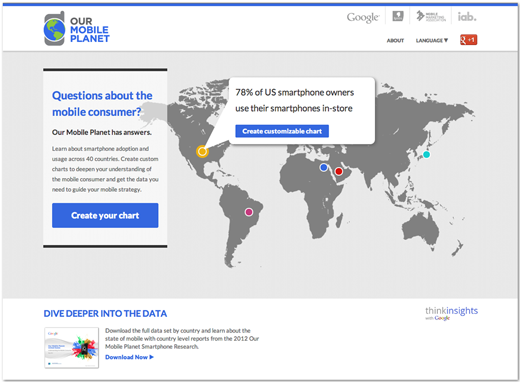
We conducted this research to help people to better understand how mobile is changing our world. You can learn about mobile-specific usage trends, use this tool to create custom visualizations of data and more. There’s plenty to discover in the latest research—to dig into new survey data about smartphone consumers in 26 countries from around the world, read our post on the Google Mobile Ads blog or visit http://thinkwithgoogle.com/mobileplanet.
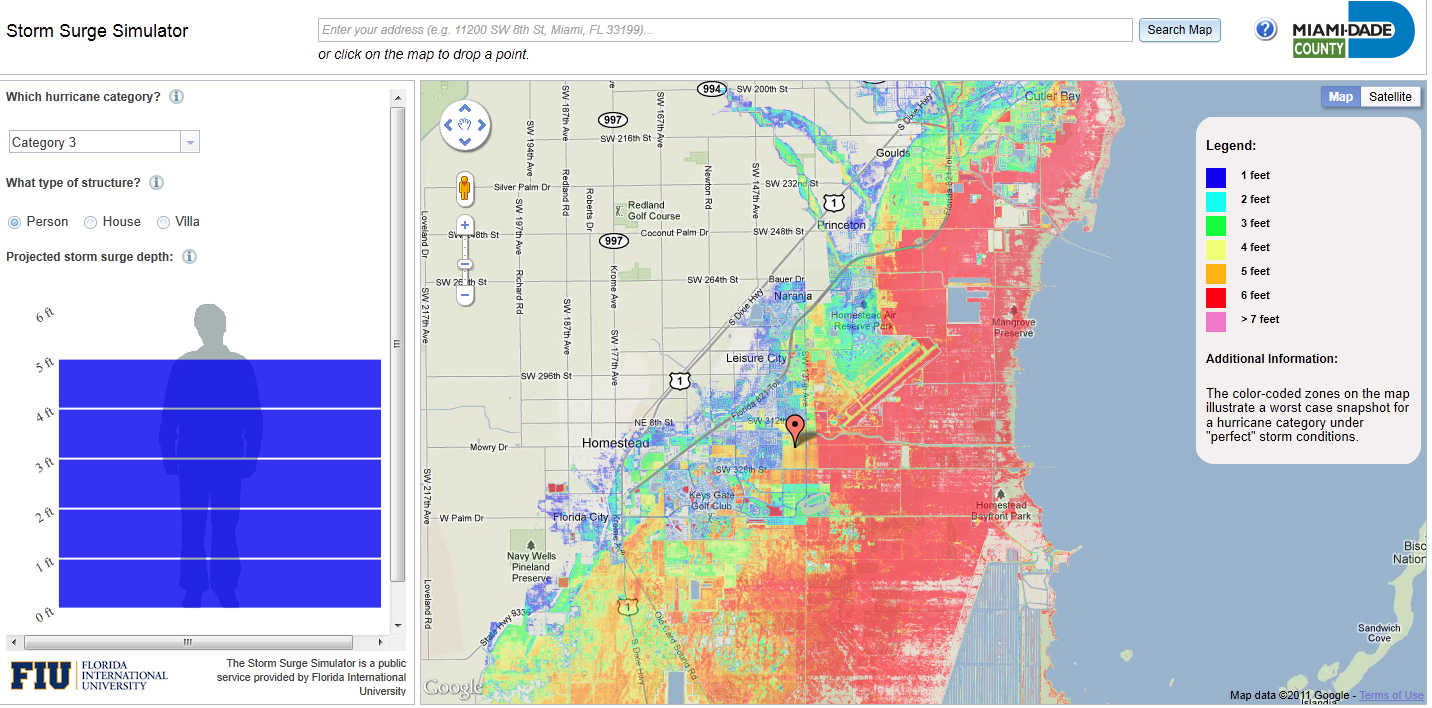
Storm Surge Simulator

Storm Surge Simulator – Google Maps

Storm Surge Predictor Miami Dade County

Click on the Map and have the depth chart show the height of the predicted storm surge.

The Storm Surge Simulator is a public service provided by Florida International University

Please note:

The color-coded zones on the map illustrate a worst case snapshot for a hurricane category under “perfect” storm conditions.

More information on this Storm Surge Simulator

http://www.miamidade.gov/OEM/storm-surge-simulator.asp

Google Translate API for business

Back in May, Google announced the deprecation of the free Translate API v1. They’re introducing a paid version of the Google Translate API for businesses and commercial software developers. The Google Translate API provides a programmatic interface to access Google’s latest machine translation technology. This API supports translations between 50+ languages (more than 2500 language pairs) and is made possible by Google’s cloud infrastructure and large scale machine learning algorithms.

The paid version of Translate API removes many of the usage restrictions of previous versions and can now be used in commercial products. Translation costs $20 per million (M) characters of text translated (or approximately $0.05/page, assuming 500 words/page). You can sign up online via the APIs console for usage up to 50 M chars/month.

Developers who created projects in the API Console and started using the Translate API V2 prior to today will continue to receive a courtesy limit of 100K chars/day until December 1, 2011 or until they enable billing for their projects.

For academic users, they will continue to offer free access to the Google Translate Research API through their University Research Program for Google Translate. For website translations, they encourage you to use the Google Website Translator gadget which will continue to be free for use on all web sites. In addition, Google Translate, Translator Toolkit, the mobile translate apps for iPhone and Android, and translation features within Chrome, Gmail, etc. will continue to be available to all users at no charge.

How to Add Gesture Search to your Android apps

Gesture Search from Google Labs now has an API. You can use the API to easily integrate Gesture Search into your Android apps, so your users can gesture to write text and search for application-specific data. For example, a mobile ordering application for a restaurant might have a long list of menu items; with Gesture Search, users can draw letters to narrow their search.

Another way to use Gesture Search is to enable users to select options using gestures that correspond to specific app functions, like a touch screen version of keyboard shortcuts, rather than forcing hierarchical menu navigation.


In this post, I’ll demonstrate how we can embed Gesture Search (1.4.0 or later) into an Android app that enables a user to find information about a specific country. To use Gesture Search, we first need to create a content provider named CountryProvider, according to the format required by Android Search framework. This content provider consists of 238 country names.

Then, in GestureSearchAPIDemo, the main activity of the app, we invoke Gesture Search when a user selects a menu item. (Gesture Search can be invoked in other ways depending on specific applications.) To do this, we create an Intent with the action "com.google.android.apps.gesturesearch.SEARCH" and the URI of the content provider. If the data is protected (for example, see AndroidManifest.xml), we also need to grant read permission for the content URI to Gesture Search. We then call startActivityForResult to invoke Gesture Search.

public boolean onCreateOptionsMenu(Menu menu) {
    super.onCreateOptionsMenu(menu);
    menu.add(0, GESTURE_SEARCH_ID, 0, R.string.menu_gesture_search)
        .setShortcut('0', 'g').setIcon(android.R.drawable.ic_menu_search);
    return true;
  }

  @Override
  public boolean onOptionsItemSelected(MenuItem item) {
    switch (item.getItemId()) {
      case GESTURE_SEARCH_ID:
        try {
          Intent intent = new Intent();
          intent.setAction("com.google.android.apps.gesturesearch.SEARCH");
          intent.setData(SuggestionProvider.CONTENT_URI);
          intent.addFlags(Intent.FLAG_GRANT_READ_URI_PERMISSION);
          intent.putExtra(SHOW_MODE, SHOW_ALL);
          intent.putExtra(THEME, THEME_LIGHT);
          startActivityForResult(intent, GESTURE_SEARCH_ID);
        } catch (ActivityNotFoundException e) {
          Log.e("GestureSearchExample", "Gesture Search is not installed");
        }
        break;
    }
    return super.onOptionsItemSelected(item);
  }

In the code snippet above, we also specify that we want to show all of the country names when Gesture Search is brought up by intent.putExtra(SHOW_MODE, SHOW_ALL). The parameter name and its possible values are defined as follows:

/**
   * Optionally, specify what should be shown when launching Gesture Search.
   * If this is not specified, SHOW_HISTORY will be used as a default value.
   */
  private static String SHOW_MODE = "show";
  /** Possible values for invoking mode */
  // Show the visited items
  private static final int SHOW_HISTORY = 0;
  // Show nothing (a blank screen)
  private static final int SHOW_NONE = 1;
  // Show all of date items
  private static final int SHOW_ALL = 2;

  /**
   * The theme of Gesture Search can be light or dark.
   * By default, Gesture Search will use a dark theme.
   */
  private static final String THEME = "theme";
  private static final int THEME_LIGHT = 0;
  private static final int THEME_DARK = 1;

  /** Keys for results returned by Gesture Search */
  private static final String SELECTED_ITEM_ID = "selected_item_id";
  private static final String SELECTED_ITEM_NAME = "selected_item_name";

As you can see in the code, when Gesture Search appears, we can show a recently selected country name, or nothing. Gesture Search then appears with a list of all the country names. The user can draw gestures directly on top of the list and a target item will pop up at the top. When a user taps a country name, Gesture Search exits and returns the result to the calling app. The following method is invoked for processing the user selection result, reading the Id and the name of the chosen data item.

@Override
  protected void onActivityResult(int requestCode, int resultCode, Intent data) {
    if (resultCode == Activity.RESULT_OK) {
      switch (requestCode) {
        case GESTURE_SEARCH_ID:
          long selectedItemId = data.getLongExtra(SELECTED_ITEM_ID, -1);
          String selectedItemName = data.getStringExtra(SELECTED_ITEM_NAME);
          // Print out the Id and name of the item that is selected
          // by the user in Gesture Search
          Log.d("GestureSearchExample", selectedItemId + ": " + selectedItemName);
          break;
      }
    }
  }

To use the Gesture Search API, you must be sure Gesture Search is installed. To test this condition, catch ActivityNotFoundException as shown in the above code snippet and display a MessageBox asking the user to install Gesture Search.

You can download the sample code at http://code.google.com/p/gesture-search-api-demo.

New Smartphone User Study

79% of smartphone consumers use their phones to help with shopping, from comparing prices and finding more product info to locating a retailer, 72% use their smartphones while consuming other media, and 88% of those who look for local information on their smartphones take action within a day.

These are some of the key findings from “The Mobile Movement: Understanding Smartphone Users,” a study from Google and conducted by Ipsos OTX, an independent market research firm, among 5,013 US adult smartphone Internet users at the end of 2010.

Check out our post on the Google Mobile Ads blog for more of the study’s findings, or join us in tomorrow’s webinar where we’ll present the full research findings. In the meantime, enjoy this research highlights video.