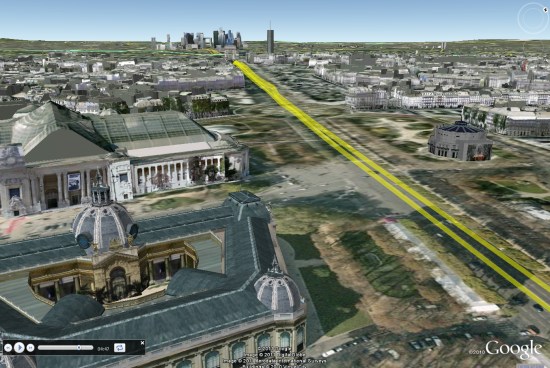
Google Earth: Le Tour de France

The 2011 Tour de France has recently gotten underway, and Cycling the Alps has built some fun tools to help you see the conditions that the riders are up against.

We’ve shown you some of their work in the past, such as the great games that they added to the site earlier this year. Now they’ve combined that technology with the Tour de France and the result is quite cool.

paris.jpg

They’ve gone through and created 3D tours, Streetview tours, profiles and games for every leg of the race. It’s quite an impressive list. Here are a few of the highlights to look for:

Stage 8

There are two stages in the Massif Central which are going to be very challenging, including the last two climbs in this stage: Col de la croix Saint Robert and Super-Besse Sancy.

Stage 12

In the Pyrenees and the climbs of this stage are epic. The Tourmalet is the most famous one but Luz-Ardiden gets a lot of attention in the media as well.

Stage 14

Stage 14 in the Pyrenees is probably the most difficult stage in the race, with six significant climbs.

Stage 18

This years tour is celebrating 100 years of high mountain stages, and every race featured a climb of the Col du Galibier. This year they’ll be climbing the pass two times; once from each side. In stage 18 they will even finish on the Galibier. This is the highest stage finish in the history of the Tour de France.

Stage 19

The next day they will climb the Col du Galibier from the other side, and all three climbs on the 19th stage are legendary.

There’s an amazing amount of info on this site about the Tour, and the games make it fun to ride around on each stage. Congrats to the CTA team for putting this all together.

Paul on Extra Effort

“Whatever you do, work at it with
all your heart…

–Paul the Apostle

Colossians 3:23

Easter is the No. 2 top-selling candy holiday (behind Halloween) according to the National Confectioners Association. Each day, in preparation for the holiday, candy makers produce 5 million marshmallow chicks and bunnies. Each year, they produce 90 million chocolate bunnies and 16 billion jelly beans.

The reason the date of the celebration changes each year dates back to 325 A.D. It was set under the Roman emperor Constantine as the first Sunday after a full moon following the Spring equinox (that’s right… a full moon and an equinox). That makes it between March 22 and April 25 every year.

Big Data – The Strata Review from JISC

Big Data is here, and it changes everything. From startups to the Fortune 500, smart companies are betting on data-driven insight. Strata, a conference organised by O’Reilly was based on three full days of hands-on training, information-rich sessions, and a sponsor pavilion filled with the key players and products. Aimed at bringing together the people, tools, and technologies to make data work the good news is that JISC has written comprehensive report for those who missed it.

The impact that freely available information has had on the learning community is truly profound, with tools like Wikipedia attracting huge audiences (over 365 million readers and growing). We can now access more data than ever – but what do we do with it all? If we want to take full advantage of all this information do we really have the tools we need? And how do we develop these tools in the future?

The internet exerts an unprecedented equalizing force in bringing access to information to everyone on the planet. More information is available (and mainly for free) now than ever before, and yet it is becoming clear that access to information is not enough. The infrastructure to store and share data within sectors is a vital part of the ecosystem, and yet it is often treated as an afterthought. We need a radical change in the way we develop infrastructure in the higher education sector, to ensure that services consumed and funded by the public can do their job as efficiently as possible and at the best possible price.
The research agenda of a university department is closely matched to the skills and goals of the professors and lecturers working in that department. The topics researched in the History department will depend on the specific knowledge and expertise of the History professors at that university. If an external company were to offer to plan their research agenda for them, it would be met with obvious cynicism. And yet the critical tools that these departments rely on are often dismissed as a secondary priority – despite the fact that those very tools define the limits of our ability to explore and learn from the data space that is the foundation of all research…..


You can read the full review (its excellent) over at http://cottagelabs.com/strata-2011-review

Check in with Google Latitude

We first introduced Google Latitude to help you stay in touch with your friends and family by making it easy to share where you are. For the 10 million people actively using Latitude each month, this “where” has been a location on a map. Starting today in Google Maps 5.1 for Android, you can also connect that location to a real place by checking in there using Latitude.

Connecting your location with places
You can still use Latitude to automatically update and share your location, but check-ins let you add context to the location—like captions to a photo. For example, I live in San Francisco but often travel around the world. Until today, sharing my location let friends and family know if I was across the globe or in their neighborhood. Now, check-ins let them see the cool restaurant I’m trying in Taipei or join me for a latte at the cafe nearby.

See where your friends are on a map and where they’re checking in.

Not your typical check-ins
Because you can use Latitude to automatically detect your location, we’ve added a few twists to checking in to make it really easy:

  • Notifications: Turn on check-in notifications in Latitude’s settings and get a notification to check in at a nearby place once you arrive. Never forget to check in again.
  • Automatic check-ins: Choose to automatically check in at specific places you designate, and you’ll be checked in when you’re there. You can talk to friends or finish your bagel without fumbling with your phone.
  • Check out: Once you leave, Latitude knows to automatically check you out of places so friends aren’t left guessing if you’re still there.

Explore your world one check-in at a time
Latitude is built right into Google Maps for Android so check-ins work across Latitude and Maps seamlessly. For example, check in at that new hamburger joint, and you’ll see its Place page with reviews to help you order. When friends check in at a place, you can go straight from their Latitude profile to its Place page to learn about it, fire up Google Maps Navigation (Beta) for turn-by-turn directions to them, and more.

You can also check in at a favorite place to earn special status there; you’ll see if you’ve become a “Regular,” a “VIP” or a “Guru” on its Place page. Keep checking in to hold onto your status or reach the next level.

Latitude check-ins are built right into Google Maps and Place pages.

Of course, we thought carefully about how to make checking in to places quick and easy while giving you control over your privacy. Just like when sharing your location with Latitude, checking in is 100% opt-in, and you can choose to share any check-in with your friends on Latitude, publicly on the web and your Google profile, or just yourself. Learn more about checking in and managing your check-ins with Latitude in the Help Center. Coming later this week, you’ll also be able to see your complete history of check-ins using the optional History tab at google.com/latitude from your computer.

Choose options for individual check-ins or turn on and off notifications in the Latitude settings.

Start checking in by downloading the latest Google Maps from Android Market (on Android 1.6+; tap here if you’re on your phone) and then joining Latitude from the main menu. You can check in everywhere Maps and Latitude are already available. If you’re using the new Latitude app for iPhone, you’ll see your friends’ check-ins, and we’ll update the app soon so you can check in too.

Just the beginning…
Checking in from Latitude is just one step in helping you connect the places you go with the people you care about. We believe in letting you use or share your location however you like, and we’re working on making location and check-ins useful in more places—across Google and the web.

Conrad Wolfram on Teaching Maths with Computers: Dangerously Wrong

So I just watched this TED talk about teaching kids maths using computers:
He makes some excellent points in it but IMHO his argument is deeply flawed.
So who rattled the bars of your cage?: It’s a fair point, I may know about teaching geography with computers but what do I know about teaching math? Well, in my past I spent time teaching maths to geologists undergrads with low academic achievement and I’ve also been on a team that built an online set of materials teaching maths to geologists (which has now disappeared from the web).
Maths by Hand: I agree with Conrad that hand calculation of maths problems is not good training for our school students, as he points out its a relatively small, uninteresting part of a bigger question. Getting students to define a real world problem in maths terms and then understand how the numerical answer is limited is more difficult and much more important.
So what’s wrong?: The techniques that he advocates – e.g. using real world examples or verifying the answers, are aspects of constructivism which is not necessarily about using computers and has been around for years. He goes on to advocate programming as necessarily giving students a good grounding in maths, again, this approach is nothing new, logo programming was put forward as a way to teach students math techniques in the 80s. As this review reveals, the technology has a lot of merit but testing results were far from conclusive. As an example, when discussing the use of logo programming to teach geometry it says:
“In summary, studies show that success [teaching geometry with logo] requires thoughtful sequences of Logo activities and much teacher intervention. That is, Logo’s potential to develop geometric ideas will be fulfilled if teachers help shape their students’ Logo experiences and help them to think about and make connections between Logo learning and other knowledge the student might have”
(emphasis mine) Doesn’t sound a lot like Conrad’s silver bullet does it?
History of Technology and Education: The phrase ‘computers as a silver bullet’ worries me because I researched the history of Technology in Education recently. What I found is that numerous times the technology of the day has been touted as offering a paradigm shift in improving education but every time the it is later found to have over hyped. Examples in the 20th century were radio, film, TV and computers (Penrose talk prezi slides 4 to 8) all of which failed to deliver because the students’ needs were lost in the application of a a silver bullet technology. To be fair Conrad does mention that computers can deliver poor teaching but he maintains that programming is the silver bullet for math teaching.
Conclusion: Students’s educational needs are complex to meet and require experienced teachers using whatever technology is appropriate to the task at hand be that computers or a big bit of paper with some felt tip pens. Teaching technologies touted as silver bullets have always been, and will always be, a dangerous distraction.