How to get the most out of your aviation portable this Spring


Springtime is in full swing as the fragrance of blossoming flowers fills the air, newborn bunnies gather in the backyard to nibble on clover, and pilots flock to the Garmin website for… software updates?

Split Screen 3D Vision and Weather2Spring is a great time to dedicate some of your spring-cleaning time toward your GPS!

Google Earth: New Imagery – August 14


Thanks to sharp-eyed GEB reader ‘Andreas’, it seems that Google has just pushed out a fresh imagery update. The full extent of the update is still unknown, but it appears to be quite sizable.


omaha.jpg 

As is usually the case, you can use Google Maps to determine for sure whether or not a specific area is fresh. This new imagery isn’t in Google Maps yet, so you can compare Earth vs. Maps to see what’s new; the fresh imagery is already in Google Earth, but the old imagery is still in Google Maps. If you compare the two side-by-side and they’re not identical, that means that you’ve found a freshly updated area in Google Earth!

[UPDATED - 13-August, 1:52pm EST]

  • China: Beijing, Shenzhen — thanks ‘drone’ and ‘hongxz’
  • Ethiopia: Gode — thanks ‘Snakeye’
  • United States: Arizona (Buckeye, Camp Verde, Casa Grande), California (Bakersfield, Coalinga, Huron, Sacramento, Visalia), Illinois (Harrisburg), Iowa (Des Moines, Sioux City), Missouri (Columbia, Jefferson City, Joplin), Nebraska (Lincoln, Omaha), New Mexico (Carlsbad, Farmington), New York (Rochester), Ohio (Dayton), Oklahoma (Tulsa), Texas (Abilene, Big Spring, Dalhart, Junction, Monahams) — thanks ‘Alex’, ‘Andreas’, ‘Munden’ and ‘Steven’

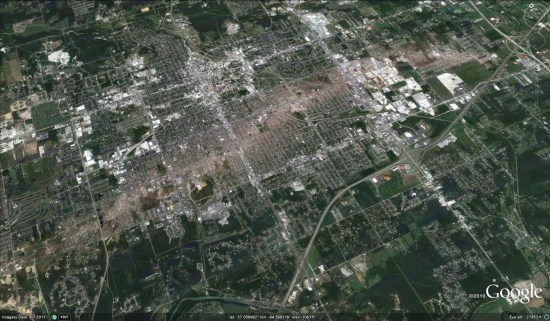
As ‘Munden’ points out in the comments, the imagery from the tornado that struck Joplin, MO is stunning:

joplin.jpg 

Bing Maps Unveils Exclusive High Res Imagery

Today, we’re excited to share with our blog readers that the Bing Maps team has updated the Bing Maps World Tour application. The Tour now showcases 153 locations where Bing Maps features new outstanding high-resolution aerial imagery that is being captured and published as part of our Bing Maps Global Ortho imagery program. Using the application, you can view the new aerial imagery through an automated “slide show” mode or explore the locations manually. The imagery is from a special collection referred to as “Geoart” for its unusual, compelling and artistic quality.

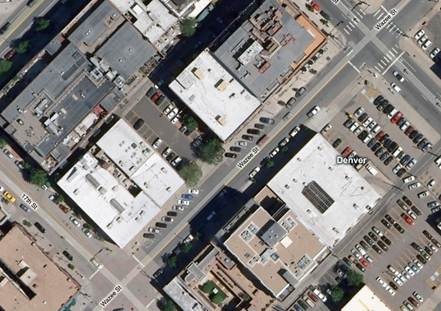
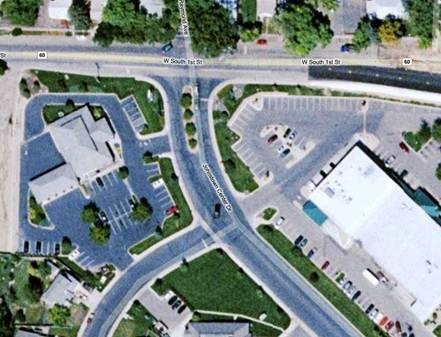
What is the Global Ortho program? Launched in the spring of 2010, this program is an ambitious mapping project that aims to provide the Bing Maps platform and consumer web site with 30cm (1 foot) aerial blanket coverage of (initially) the continental United States and Western Europe. A challenge for consumers and enterprise organizations using web mapping services has been that much of the imagery featured there has historically been a patchwork of satellite and aerial imagery of different vintage, quality, clarity and detail. The experience for users of these services has been inconsistent at best, varying by location: while you might expect to find higher resolution aerial images of 15-30cm (meaning that each screen pixel equals 6-12 inches on the ground) over key urban locations, a search in a more rural or remote location would likely yield satellite views of at best half that accuracy and detail. The two below screen captures of Denver and Johnstown, Colorado—locations just 50 miles apart—demonstrate this point.

clip_image002

clip_image004

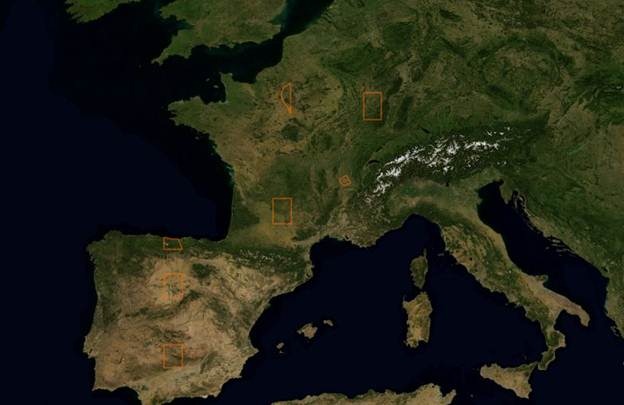
That is all now changing. The Bing Imagery Technologies team (BITs), located in Boulder, Colorado, has spent more than a year collecting the new Bing Maps imagery, and has been quietly publishing this aerial imagery to the Bing Maps web site. The first of it began appearing in August 2010 and to date, 46% of the project has been captured and roughly 349 blocks equaling 2,771,192 sq kilometers from 37 States, France and Spain have been published, plotted in the below maps. The project is scheduled for completion by June 2012 at which point a refresh cycle will begin to update much of what will already have been collected, with priority placed on locations that have been more subject to change (as opposed to, say, the Mojave Dessert). As its name implies, the Global Ortho program aspires to be truly global, covering the planet with straight down aerial views (ortho images).

clip_image006

What this means to people using Bing Maps and applications built on the Bing Maps platform is that they can trust Bing Maps to provide the same experience regardless of where they search. They will be able to visit any location in the United States or Western Europe online and see it with the same brilliance, resolution and accuracy. 30cm provides a lot of detail! Check out the brilliance of the below image captured over Austin, Texas. Equally important: wherever you are exploring in Bing Maps, you are likely to find CURRENT imagery.

clip_image008

How is Microsoft tackling such an aggressive project? It begins with a business approach that Microsoft is well-known for: partnerships. To collect the imagery, Microsoft is working with aerial mapping organizations that are customers of our UltraCam digital aerial camera business and experts in aerial image collection. Microsoft came into the aerial sensor business in May of 2006 through the acquisition of Vexcel Imaging, GmbH in Austria. Since that time, the UltraCam business has grown to include a commercial line of award-winning and widely adopted aerial camera systems and the UltraCamG, developed specifically for the Global Ortho program and not commercially available. The most important feature of the UltraCamG is that it allows our aerial mapping partners to fly at very high altitudes and capture about 50% more pixels across the flight line than any other digital aerial mapping camera system which translates into time and cost savings.

Then this imagery is delivered to the BITs team in Boulder where it undergoes quality control and is processed to remove the building lean and create the straight down views—“orthos”, as they are called. They are then color balanced so that the color quality is consistent among each view and following this, is delivered to our partner DigitalGlobe—a leading satellite imagery provider—to sell to government and commercial entities for offline use, and stitched to create seamless mosaics for publishing to Bing Maps. This stitching allows you to pan, zoom and scroll through locations in continuous movements.

The storing and processing of this imagery requires a significant amount of computing power. The BITs data compute site provided by DELL has a huge amount of container-based compute and storage power to be able to automate a lot of the things would normally be done manually: currently in excess of 16,500 compute cores and roughly 55 petabytes of storage. Yet this facility runs off hydroelectric power and between this and the DELL design that features evaporative cooling, it is highly-efficient from a power usage effectiveness (PUE) perspective ( 1.03 ).

But enough reading about the Bing Maps Global Ortho program! Check out the video with interviews of key members of the BITs team and lots of stunning examples of the imagery being collected! Then be sure to check out the the Bing Maps World Tour application to see more of this stunning imagery.
V

The New GeoServer 2.1

GeoServer 2.1 (Major Update)

“GeoServer is a Java-based software server that allows users to view and edit geospatial data. Using open standards set forth by the Open Geospatial Consortium (OGC), GeoServer allows for great flexibility in map creation and data sharing.”


18 months in the making:
WMS Cascading

New Features

Something many users have asked for since the very addition of WMS support is cascading, the ability of GeoServer to proxy for another remote WMS server (be it GeoServer, MapServer, or ArcGIS). This feature has many uses, such as pulling in a remote base layer and overlaying local vector data onto it or securing a locally unsecured map server. Special thanks to the University of Perugia for sponsoring this feature.

Virtual Services

Anyone who has published a large number of layers or feature types with GeoServer has probably at some point been annoyed by the fact that every single layer is published by a single global service. WMS has the ability to group and nest layers but WFS and WCS have no such equivalent. Thanks to virtual services, one can create multiple service endpoints within a single GeoServer instance. Special thanks to Landgate for funding this work.

Layers from SQL

GeoServer has always been good at publishing a flat database table but users often need to do more—such as pre-filter the data in a table, join two tables together, or generate column values on the fly with a function. Before this feature, the recommendation was to create a view, yet views can be a maintenance burden and are at times problematic.

Now one can create a layer directly from an SQL query and query definitions can be parameterized to create dynamic queries on the fly. These parameters can be restricted with regular expressions to prevent an SQL injection security hole.

Special thanks to Andrea Aime for spending much of his personal time on this one and to OBIS for providing the funding for the parametric component of the work.

Web Processing Service (WPS)

With 2.1 and the arrival of WPS we welcome a new OGC service into GeoServer. The Web Processing Service is an OGC service for performing geospatial analysis functions over the web. The specification is extensible in nature and allows for simple processes ranging from buffering a geometry to more complex processes such as image processing.

Historically, GeoServer has been focused on data delivery and did not provide tools for performing analysis on spatial data. WPS fills that gap, making GeoServer a more compete solution for geospatial web services.

Thanks to Refractions Research for the initial contribution of the WPS module and to Andrea once again for taking personal time to bring WPS support to its current state.

Unit of Measure

Support for units in SLD allows one to specify values in measurements other than pixels such as feet or meters. This adds a very powerful capability to SLD that may alleviate the need for multiple scale-dependent rendering rules and may greatly simplify complex SLD documents.

Special thanks to Milton Jonathan for the initial GeoTools work to make unit of measure support possible and to Andrea for working with Milton to improve the initial patch. Note that this feature has also been backported to the stable 2.0.x branch thanks to support from SWECO and Malmö City of Sweden.

DPI Scaling

GeoServer renders images at a resolution of 90 DPI by default. While this is acceptable for most standard screen resolutions, it is unacceptable for higher-resolution printed materials. Now it is possible to supply a format option to a WMS request to control the DPI setting on the fly.

Special thanks again to SWECO and Malmö City of Sweden for sponsoring this work. Note also that this feature has also been backported to the 2.0.x branch.

Graphical File/Directory Chooser

Ever found it difficult to remember the full path when loading a shapefile or GeoTIFF? This new improvement brings an easy graphical file and directory selection tool for browsing the file system on which GeoServer resides. This is definitely a great enhancement to make GeoServer even easier to configure.

Core improvements to support a database-backed catalog

GeoServer’s core catalog interfaces received some tweaks to more easily support different backend storage formats. The current in-memory implementation has a number of drawbacks—the most notable being that it is memory-bound, meaning it cannot scale to accomodate large numbers of layers. Support for specific new storage formats is still only available as a community module but these core improvements make it possible to more easily swap between different backends.

Font Improvements

Adding new fonts to maps should now be much easier, as one can drop font files directly into the GeoServer data directory and have them be recognized by GeoServer. The admin interface will list all fonts that are currently available, including those made available by the Java Virtual Machine.

Upgrade to Spring Security 2.0.6

GeoServer has always had Acegi Security at its core but since that library was absorbed by the Spring community it has been improved and upgraded into Spring Security, the official security module of the Spring portfolio. This brings a number of new security protocols to GeoServer, including OpenID and Windows NTLM. With even more powerful options, it should now be easier to customize the security setup.

WCS Limits

While WFS and WMS have both had the ability to limit what a user can request, now similar controls are in place for WCS calls as well. Thanks to MassGIS for funding this improvement.

WMS 1.3.0

WMS 1.3.0 is the newest version of the Web Map Service protocol. Special thanks to Ordnance Survey, Britain’s national mapping agency, for providing OpenGeo with funding to complete its implementation in GeoServer. With WMS 1.3 mandated by the INSPIRE Initiative, Ordnance Survey opted to fund the GeoServer project so that other organizations in the UK and the rest of Europe could meet their INSPIRE requirements and everyone across the globe could benefit.

SLD 1.1 / SE 1.1 enhancements

Though not every new option is fully-supported, it is now possible to use most SE 1.1 documents in GeoServer. User feedback on which new options should be supported first is greatly appreciated. Also funded by Ordnance Survey is a community module to implement the WMS extensions for INSPIRE View Service compliance—namely the language parameter and several extended capabilities fields.

GeoWebCache Integration

GeoWebCache integration allows clients to enjoy the benefits of tile caching through the regular GeoServer WMS endpoint. This enables GeoWebCache to transparently proxy for the GeoServer WMS without the need for a separate service endpoint. Taking advantage of the recently-added disk quota functionality, GeoWebCache now provides the ability to set limits on the amount of disk space used for storing tiles, allowing users to control and limit the size of the tile cache on disk. Big thanks to Gabriel Roldán of OpenGeo for the great GeoWebCache improvements.

Improvements to RESTConfig

This release also brings some improvements to RESTConfig, which is now shipped with GeoServer by default. Improvements to the API include a file upload operation that now allows for uploading files into an existing data store. This addition allows users to upload a shapefile and have it automatically converted into a PostGIS database and published as a PostGIS layer rather than as a Shapefile layer. The API also supports recursive DELETE operations, making it more convenient to remove resources that contain other resources such as stores or workspaces. Thanks to David Winslow and Justin Deoliveira of OpenGeo for these improvements.

Improved Raster Reprojection Performance

Thanks to some great work from GeoSolutions, raster reprojection performance has been significantly improved by using linear appoximations of transformation functions.

WCS Request Builder

Thanks to Andrea Aime, there is now a Web Coverage Service request builder for graphically building WCS requests to test a coverage service. As clients for WCS have always been sparse, this tool goes a long way towards making the service more usable.

Run multiple GeoServer instances from a single data directory

There now exists a new parameter that will once again allow multiple GeoServer instances to run from a single data directory. This parameter, named “GWC_DISKQUOTA_DISABLED”, will disable the GeoWebCache disk quota module and prevent it from maintaining a lock on the data directory.

Source:
http://blog.geoserver.org/2011/05/12/geoserver-2-1/

Prairie Flooding Satellite Images

Spring Flooding in Manitoba (NASA EO)


NASA’s Earth Observatory has a number of satellite images of the spring flooding in the Canadian Prairie Provinces and the U.S. Upper Midwest. The most recent image, above, is a MODIS image combining visual and infrared views of the flooding in southern Manitoba on April 24.