How Google Earth is being used by the Philippine National Police


Over the years, Google Earth has been responsible for helping a huge number of non-profit and other worthwhile organizations around the world. We’ve shown you how environmental groups have been using Google Earth for more than six years, how it’s been used to fight against rainforest logging, and Google Earth Outreach consistenly showcases many other amazing organizations from a variety of countries.

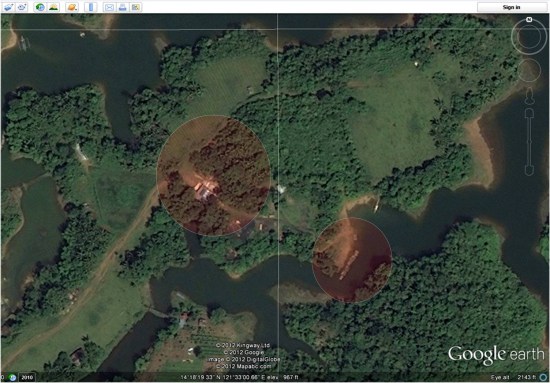
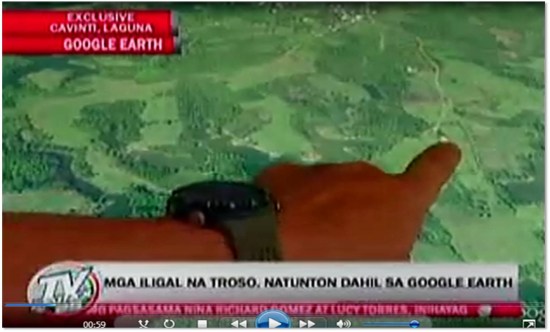
Similarly to the others that have used Google Earth to fight against deforestation, the Philippine National Police have been using Google Earth to fight illegal logging in the province of Laguna.
 

map2.jpg 

Here is their story, in their words:

On behalf of all the personnel of Philippine National Police (PNP) Laguna, I would like to express our gratefulness for the wonderful gift of your Google Earth services. It contributed a lot and it has been a great part of our efforts against illegal logging here in the province of Laguna. Nationwide, we are shocked by the effect of the natural and man-made calamities wreaking havoc to our country resulting to loss of lives and properties. Man-made calamities are greatly attributed to rampant illegal logging and deforestation thus causing flash floods and landslides. Since Laguna had been one of the most affected areas of flash floods and landslides, the Laguna PNP initiated the creation of a dedicated Provincial Anti-Illegal Logging Task Group “BERDE” purposely to ensure the implementation of OPLAN “BERDE (Boost Economic Reserves for the Development of Ecosystem). Through the help of Google Earth, we were able to locate specific targets of our OPLAN BERDE. Our operations yielded positive results on illegal logging sites like Cavinti, Laguna that was identified by using Google Earth. Initial operation last April 13, 2012 resulted to the recovery of forest products, machinery equipment, tools and conveyance abandoned during apprehension. Google Earth has been a major contributing factor to the success of our operation. Because of you and your innovative services, we can keep moving forward towards the attainment of our goals in the field of law enforcement.

As Google Earth imagery continues to become higher resolution and update more rapidly, it will become an even more useful tool for organizations like this one.
 

Picture4.jpg 


Google Earth: High-resolution imagery in Antarctica

As Google has continually improved the quality of their imagery across the globe, one area always seemed to stay low-res — Antarctica. Thanks to the help of the Polar Geospatial Center (PCG), that’s beginning to change.

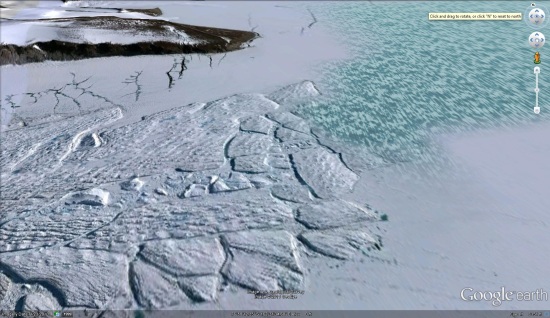
A great example of that is the Mackay Glacier Tongue, located in Granite Harbor, seen here:

mackay.jpg

You can see it for yourself, as shown in the article, using this KML file.

So far, the PGC has helped Google update nearly 1,000,000 square kilometers, with another 275,000 square kilometers added every three months. While it will take a while to get the entire continent updated (more than 14,000,000 sq km), they’re certainly making great progress.

Along with updating the quality of the imagery, they’re also working to improve the accuracy of the location of the imagery. The PGC’s Paul Morin will be heading down to the Antarctic Peninsula soon to help improve the imagery from being off by as much as 30 meters to being accurate within a single meter.

The full article at The Antarctic Sun is quite interesting and well worth your time to read. We all enjoy the constantly improving imagery quality in Google Earth, and the PGC is just one of many companies working with Google to help move things forward.

(via @OgleEarth)

Sea Ice Extent updated for 2011


As they’ve done for the past few years (here is 2010), the National Snow and Ice Data Center (NSIDC) has produced their annual Sea Ice Extent data


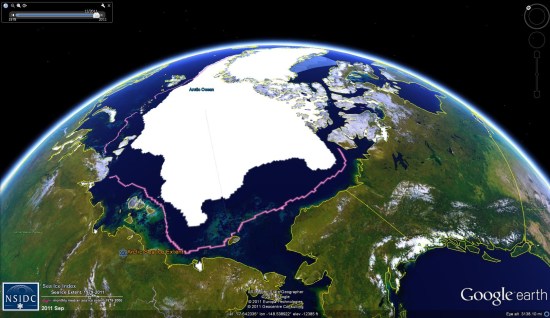
extent-2011.jpg 

While 2011 wasn’t a record year for ice loss, it came close, ending just slightly above the mark set in 2007. You can view the data for yourself by loading this KMZ file.

Here are the details for this year:

Average ice extent for September 2011 was 4.61 million square kilometers (1.78 million square miles), 2.43 million square kilometers (938,000 square miles) below the 1979 to 2000 average. This was 310,000 square kilometers (120,000 square miles) above the average for September 2007, the lowest monthly extent in the satellite record. Ice extent was below the 1979 to 2000 average everywhere except in the East Greenland Sea, where conditions were near average.

As in recent years, northern shipping routes opened up this summer. The Northern Sea Route opened by mid August and still appeared to be open as of the end of September. The southern “Amundsen Route” of the Northwest Passage, through the straits of the Canadian Arctic Archipelago, opened for the fifth year in a row. Overall, sea ice in the wider and deeper northern route through Parry Channel reached a record low, according to Stephen Howell of Environment Canada, based on Canadian Ice Service analysis. Parry Channel had a narrow strip of ice that blocked a short section of the channel, but it did appear to open briefly in early September.


The earthquake tsunami changed the Ice


When the earthquake (and subsequent tsunami) struck Japan earlier this year, we provided as much data as possible about the disaster. What many people didn’t realize was that the tsunami continued to travel across the ocean, eventually striking Antarctica with a great deal of force. This caused some flexing and breaking of the Sulzberger Ice Shelf, which resulted in two large icebergs being released, reminicient of the chunk of the Wilkins Ice Shelf that broke off a few years ago. Combined, the icebergs cover an area of 125 square kilometers, or more than twice the size of New York’s Manhattan Island!


sulzberger_sar_2011075.jpg 


You can download the KMZ file here.

If you turn on the “Borders and Labels” layer in Google Earth, you’ll see the yellow outlines match up quite well with the dark patches in the overlay, as seen here:


overlay.jpg 


Google Earth: Learn about a place

People  are usually amazed how quick and easy it is to put a place in Google Earth. Here you can see 10 easy steps used to learn about a place I read about today at GoogleSightseeing. They were writing about the extensive canal system across Germany – something I was not really familiar with. I was fascinated by their fourth entry which described the Magdeburg Water Bridge, which they said is the longest aqueduct in Europe.  Watch the short video below to see 10 steps I took to learn more about this place in GE:

You can watch the steps I took in the video above.

  1. First I found something interesting through a blog post at GoogleSightseeing.com. Alex posted some details in his post, but I find it more interesting to discover with Google Earth.
  2. So, I followed the link to view the location in Google Earth.
  3. The first thing I do in Google Earth is turn on the “Places“, “Photos” and “More” layers in Google Earth.
  4. The blue icons represent photos taken by many people around the world found at Panoramio (millions of photos are mapped into Google Earth).
  5. I quickly found a ground level photo which showed the bridge (there were even aerial photos in this case).
  6. Found a nice photo from the bridge itself as well.
  7. The white icon from “More” layer represents a Wikipedia story. Here you get a good description of the Magdeburg Water Bridge and a link to the full article with even more details.
  8. You can use the Google Earth navigation gadget in the upper right to turn and tilt your view to get other perspectives of any site.
  9. Zoom out a bit and turn on the Roads layer to get a handy map of the area.
  10. Zoom out even more and turn on the Borders and Labels layer (you might want to turn off the other layers at this point). This gives you a broader perspective. (Tip: you can also turn on the “View->Overview Map” – or hit “CTRL-M” to get a fast broad perspective map).

These are just some really basic steps I often take when trying to learn about a place. Another useful layer is the Google Earth Community layer, found inside of the “Gallery” layer. Although, for some popular places you may find dozens of placemarks by people who have posted about their favorite places – almost too much information. There are many other collections and tools (written about on this blog) for learning all kinds of things like weather, conditions of the environment, real estate prices, history, etc.

The world is a big place, and these techniques won’t work for every single place on the planet. But, if you try them out, you will probably be surprised just how much you can learn (and how many hours you can spend learning about places you’ve always wanted to visit).

via googlearthblog