Google Earth on Earth Day

Earth Day in Google EarthOnce again it’s Earth Day. A time to sit back and think about our wonderful planet, and some of us will be out picking up some trash, or just enjoying nature.

While researching thoughts for this post, I had a chance to talk to David Levine from Geostellar for a few minutes yesterday. They’re doing some great work in developing systems to allow you to view the solar potential of any building on earth. They generate the data using LIDAR and other techniques, then export it for viewing in Google Earth and the Google Earth Plugin. Android and iOS apps are due out later this year. To get an idea of what they do, check out the video below.

For those of you stuck inside due to weather, work, or other reasons – perhaps you might want to spend the day exploring our wonderful planet through the power of Google Earth. Here are a few links of stories from Google Earth Blog (GEB) in the past year describing environmental related content available for viewing in Google Earth:

The Home Greenover Project — A neat way to show off eco-friendly homes.

Diving Deep with Richard Branson — A new expedition to explore the “last frontiers of our own planet” at the deepest parts of the ocean.

Visualizing the vast problem of marine debris — Exploring the issue of trash in the world’s oceans.

Flooding Google Earth — Visualizations of Earth if sea levels experience significant rises.

Predict how much solar power your house could generate — Based on your area, predict how much solar energy your home could generate.

The WaterAid Point Mapper, helping find fresh water — A great tool to help sub-Saharan organizations map rural water points.

Google Earth Engine, an amazing tool for scientists and researchers — Released at COP 16, this tool helps scientists analyze massive amounts of climate-related data.

Sea Ice Extent Animation updated for 2010 — An animation showing the changes in the size of the ice cap.

A climate change tour of cold places — NSIDC released this project to show the snowy and icy regions of the world covering sea ice, glaciers, ice shelves and permafrost.

Tour of the proposed Belo Monte Dam Complex — A great visualization of the high-debated proposed dam complex in the Amazon.

New weather features in Google Earth 5.2 — Some cool enhancements to the weather layer in Google Earth 5.2.

Interactive multi-layered Google Earth map of 4 degree temp rise — A map showing the potential impact of a 4 degree rise in global temperature.

Soil Moisture Animations — A worldwide map showing soil moisture levels, and important tool for people in a variety of fields.

Visualizing the vast problem of marine debris

mdc.jpgWith the fifth international Marine Debris Conference taking place this week in Hawaii, Google and NOAA (the National Oceanic and Atmospheric Administration) have put together some resources to help visualize this growing problem. The conference aims to help provide tools and information, as well as to inspire innovation.

To that end, Google and NOAA have built a tour to showcase some of the major problems our oceans are facing, as well as the main sources of marine debris around the world. To view the tour, you can view the tour in the Ocean Gallery, download it as a KMZ file, or watch the video below:

For more, check out the Google Lat Long Blog or the official NOAA website.

Follow the Mission Blue expedition to Salas y Gomez

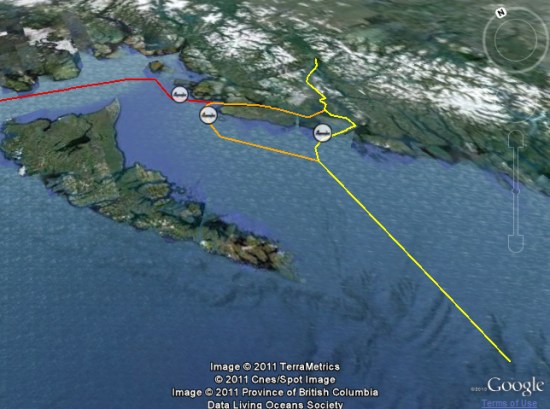
While many of us would like to embark on a voyage across the ocean, we can’t all be Frank Taylor. Fortunately, Google Earth provides a great way to explore places virtually, such as with the latest installment in the “Mission Blue” series.

Last month, we showed you Mission Blue’s tracking of the gulf oil spill recovery effort. This month, they’re heading east from Easter Island to the tiny island of Salas y Gomez in an effort to do some research in the largely unexplored waters around the island.

salas.jpg

As with the gulf spill mission, they’re providing updates in a variety of ways. You can track it by finding the blue ship icon near Easter Island (be sure the “Places” layer is turned on), by downloading this KML file, or you can track them in the Google Earth Gallery using the Google Earth Plug-in.

Salas y Gomez was updated in the most recent imagery update, featuring imagery that is just a few weeks old. It’s a bit fuzzy, but it’s much better than what they used to have there. To check out the island for yourself, you can fly there using
this KML file.

For more, check out the full entry on the LatLong Blog or read stories from the crew on the Mission Blue News Watch blog.

Flooding Google Earth

We’ve discussed how flooding can be visualized a few times in Google Earth, because it’s a great medium with which to show off catastrophes such as that. In addition to helping with fresh imagery from recent floods in Pakistan and Nashville, it’s also been used to help bring to life the 1966 flood in Florence and an animation of how rising sea levels would affect various cities.

Today’s post comes from Richard Treves over at Google Earth Design. He’s recently read Will Self’s “Book of Dave, which imagines a future where sea levels have risen over 100 meters.

Richard has taken that idea and given step-by-step instructions on how to simulate a 100m rise in sea level for any area of the world. I took his example and put it over London, with the results seen here:

london-flood.jpg

To view that file in Google Earth, you can download this KMZ file.

It’s a great way to visualize something like this, and Richard put together a great guide for it. However, I’d like to make one small correction. In step #4, he advises choosing “Relative to Ground” for the water level. While this will put water 100m deep in the area you choose, it’s not necessarily representative of a 100m rise in sea level. Instead, choose “Absolute” in step #4 (as I did in the KMZ above) to see what it would be like if the sea level rose 100m world wide.

As Richard mentions, and as you’ll see in the screenshot above, leaving 3D buildings turned on is a great way to see the scale of the depth of water. Check out his blog and go try it for yourself.

The WaterAid Point Mapper, helping find fresh water

As we’ve discussed a few times, water is a remarkably scare resource in many parts of the world, and Google Earth has proven to be a great way to learn more about the problem. A great example is the UNICEF: Water and Sanitation layer that was released a few years ago.

The folks at WaterAid have recently developed a Mapping tool called the Water Point Mapper. It takes data via Microsoft Excel and uses macros to generate KML files. The tool is now widely used by WaterAid country programs and partner organizations across sub-Saharan Africa to map rural water points. The tool empowers communities to manage their water sources and offers district level planning and resource allocation.

The Mapper can generate a range of point based and area based maps for monitoring a wide selection of status indicators. The list includes water source coverage (with and without functionality), functionality, water source type, revenue collection and access distance. Also a range of water quality parameters can be mapped, such as fluoride and iron. It can be configured for use in any country, as long as you can provide them with the necessary shapefiles for district and sub-district administrative levels.

There aren’t any sample files on the site, but they were kind enough to produce a few of them for us that you can check out. The first is a fairly standard map (KMZ file):

water-points.jpg

The next is a map that features “radius of influence” spheres, so you can see how much area each specific water distribution point is able to affect (KMZ file):

access-distance.jpg

For more info, check out their site at www.waterpointmapper.org.